Commission Plans Reimagined: Rules and Multiple Reward Units
We've completely redesigned how commission plans work. Instead of a single flat rate or a simple product-based split, you can now build rule-based commission plans with multiple commission units — each with its own conditions and rewards.
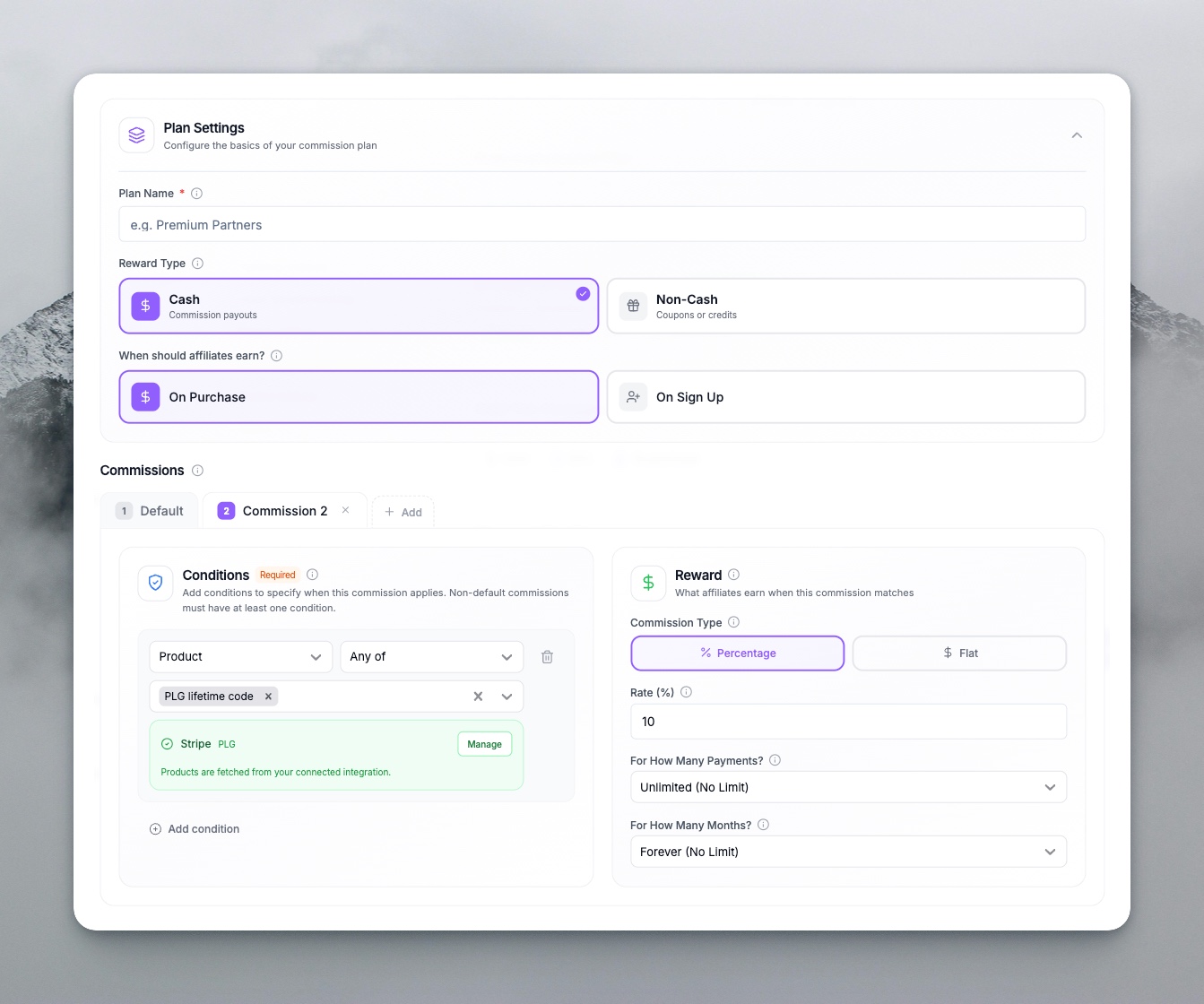
The New Model: Rules + Commission Amounts
Each commission plan is built from commission units. A Commission Unit says:
IF [these rules match] THEN [use this commission amount]
The first commission unit whose rules match determines the reward. If none match, a default commission applies.
Rule Types
You can define conditions using:
| Rule Type | What It Checks | Example |
|---|---|---|
| Order Amount | Total order value | Order is greater than $100 |
| Product | Products in the order | Customer purchased Product A or Product B |
| Statement Description | Payment description text | Description contains "subscription" |
| Landing Page | URL the customer came from | Landing page is /promo/summer |
Combine rules with AND (all must match) or OR (any can match) within a group. Use multiple groups to express complex logic like:
- If order > $200 AND contains Product X → 15%
- If order > $100 OR contains Product Y → 10%
- Otherwise → 5%
Multiple Commission Units Per Plan
Each commission unit has its own reward. That reward can be:
- Cash — Percentage or flat rate
- Coupon — A specific discount (from Stripe, Shopify, WooCommerce, or API)
- Credits — Store credits (Shopify, Stripe, WooCommerce) or custom credits
So within one plan you can have:
- Commission 1: Order > $500 → 20% cash
- Commission 2: Product is Premium Plan → $50 flat + 10% cash
- Commission 3: Landing page is /affiliate → 15% off coupon
- Default: 5% cash
Each unit has its own duration (e.g., first 3 months, first 5 payments), recurring behavior, and product requirements.
Recurring Commission and After-Periods
For subscription or recurring revenue:
- Set number of payments (e.g., first 5 payments) and number of months (e.g., 12 months)
- Define commission after periods — e.g., 15% for the first 3 payments, then 5% for all future payments
- Mix cash and non-cash across periods
Product Requirements
At the plan or commission unit level, you can require that the sale includes specific products. Commission only applies when the customer purchases one of the qualifying products. Products are pulled from your connected integration (Stripe, Shopify, WooCommerce), so setup stays simple.
Why This Matters
- Incentivize the right behavior — Reward high-ticket sales, specific products, or traffic from certain pages
- Segment by performance — Different rules for different scenarios without creating multiple programs
- Mix reward types — Cash for some conditions, coupons or credits for others
- Transparent logic — Rules are visible in the plan preview so affiliates understand exactly how they earn
Getting Started
- Create or edit a commission plan (V2 editor)
- Add commission units with rule groups and commission amounts
- Set rule types, conditions, and values (e.g., order amount, products)
- Configure each commission amount (rate, duration, reward type)
- Set a default commission for when no rules match
The plan builder guides you through rule setup and shows a live preview of how commissions will be calculated.