Commission Plan Preview: Full Transparency into how commissions are calculated
We've built a commission plan preview that breaks down exactly what an affiliate will earn in every scenario. No guesswork, no confusion — just a clear, detailed view of the compensation structure.
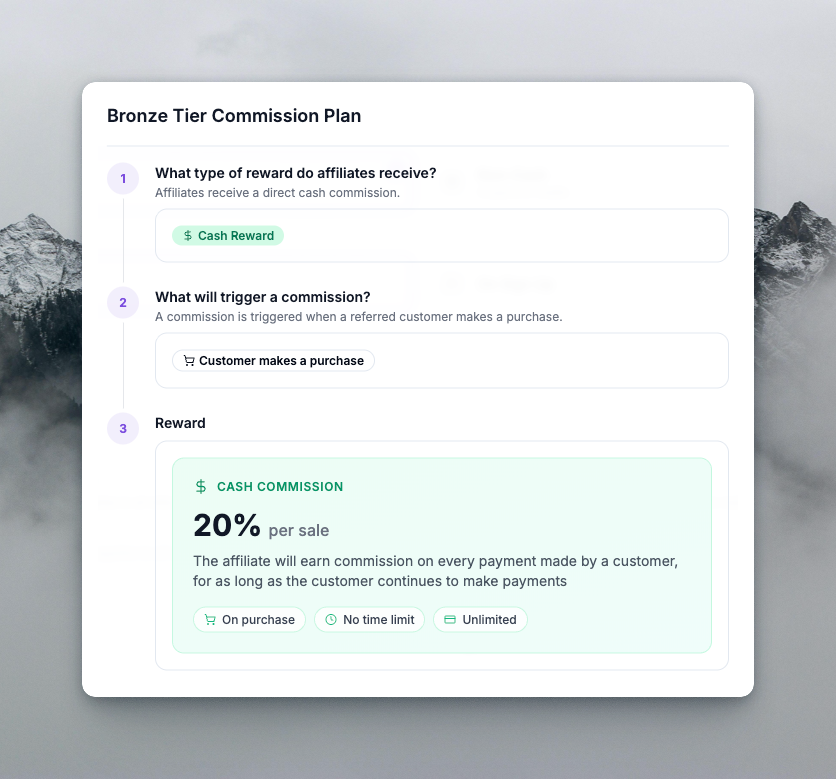
Where You'll See It
The preview is available in two places:
- Admin Dashboard — When viewing or editing commission plans, admins can open a preview to see the plan exactly as affiliates will see it
- Affiliate Portal — Affiliates can view their own commission plan with the same breakdown, so they always know how they're rewarded
What the Preview Shows
Overview Tab
- Reward type — Cash, Coupon, or Credits (with clear badges)
- Trigger — On sign-up vs on purchase
- Key details — Rate, duration, payment limits, product requirements
Cash Plans
- Commission rate (percentage or flat)
- Per sign-up or per sale
- Duration (e.g., first 12 months, no time limit)
- Payment limits (e.g., first 5 payments, unlimited)
- Commission changes over time — If you use after-periods (e.g., 15% for first 3 payments, then 5%), the preview shows the full timeline: initial period, then each subsequent period with its rate and scope
Coupon Plans
- Discount (e.g., 20% off, $10 off)
- Source (Stripe, Shopify, WooCommerce, API)
- Duration (one-time, forever, repeating)
- Max coupons an affiliate can earn
- How affiliates earn — Every sign-up, every N sign-ups, first purchase, every N purchases, with time windows (e.g., within 6 months)
Credit Plans
- Amount per sign-up or per purchase
- Credit type (Shopify, Stripe, WooCommerce, Custom)
- Unit label (e.g., "credits", "points")
- Max times credits can be earned
- Earning window and qualifying payments
Conditions Tab
For rule-based plans, the preview shows:
- Rule groups — Each group with its rules (order amount, product, landing page, statement description)
- Connectors — AND / OR between groups
- Human-readable rules — e.g., "Order Amount is greater than $100", "Product Purchased is any of [Product A, Product B]"
- Product names — Fetched from your integration so affiliates see real product names, not IDs
Commissions Tab
When a plan has multiple commissions:
- Each commission listed with its rate, duration, payments
- Reward type per commission (cash, coupon, credits)
- Conditions that trigger each commission
- Default commission when no conditions match
Why This Matters
- Fewer support questions — Affiliates can self-serve and understand their plan
- Faster onboarding — New affiliates see their compensation structure immediately
- Admin confidence — Verify complex plans before publishing
- Consistency — Same view for admins and affiliates, so everyone is aligned
Fully Translated
The commission plan preview is fully translated across all supported languages. Affiliates see the breakdown in their preferred language — no more mixed-language or English-only plan details.
Try It
- Admins: Open any commission plan and click View or Preview
- Affiliates: Go to your commission plan in the affiliate portal and open the details dialog
What you see is what they get.