

Consent modes
Consent mode decides “When Atlas needs marketing consent before it sends a visitor’s events.” There are three options: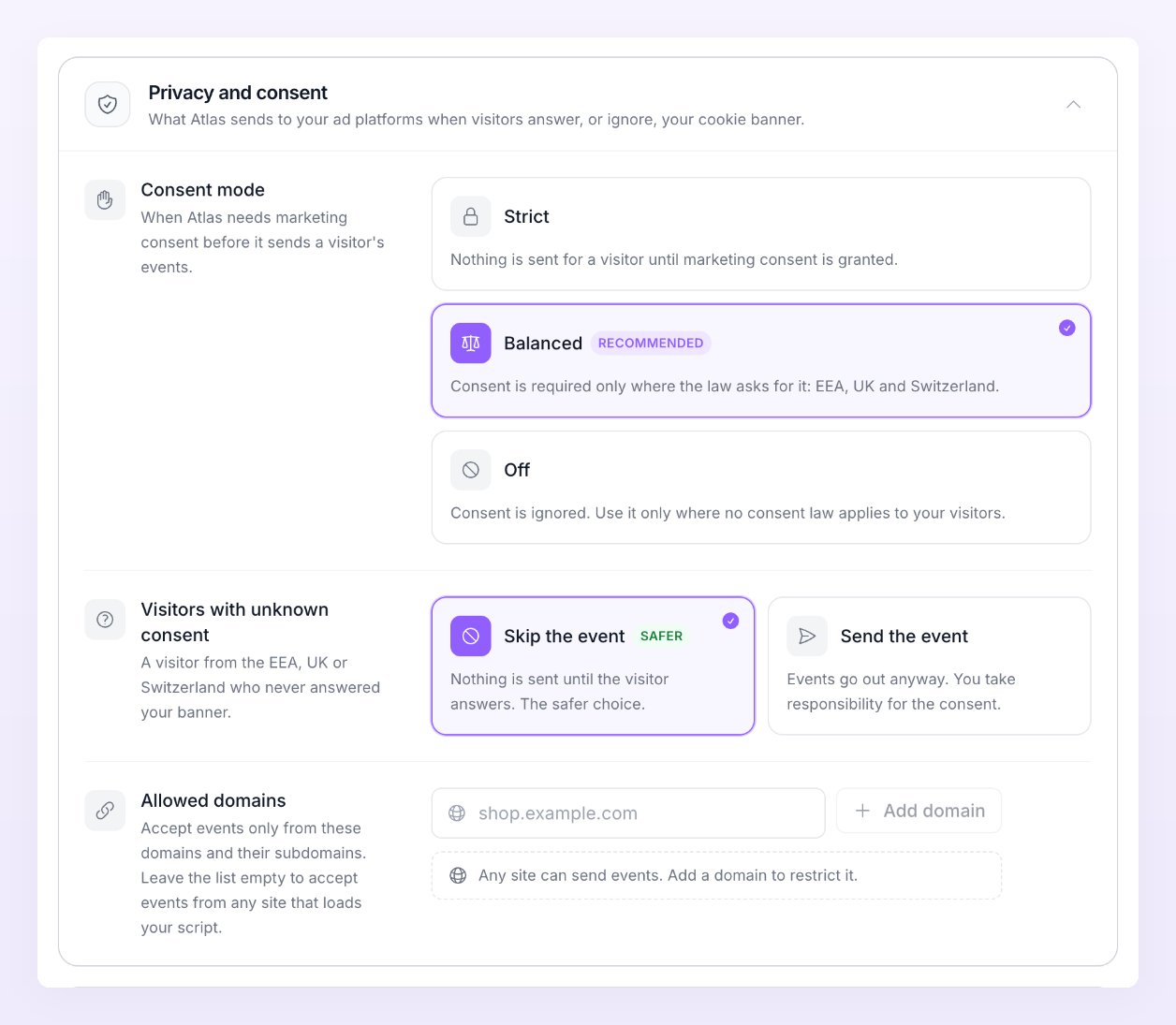
Whatever the mode, a visitor who declined marketing consent is never sent to an ad platform. The event shows as Skipped in Live activity with the reason “Visitor declined marketing consent”. Klaviyo follows the same marketing flag as the ad platforms.
The consent regions are the EEA, the UK and Switzerland, read from the visitor’s country. A visitor whose country Atlas cannot tell counts as not needing consent.
In the browser, the tracker applies the same rules before anything leaves the page. Until a visitor in a consent region answers, it sends no identifiers at all, and in Strict mode it holds that visitor’s events entirely. Google Ads conversions on your site use Google’s Consent Mode: they start as denied in the consent regions (unless your mode is Off) and update the moment the visitor answers.
Unknown consent
A visitor in a consent region who never answers your banner has unknown consent. Visitors with unknown consent (“A visitor from the EEA, UK or Switzerland who never answered your banner.”) decides what happens to their events:- Skip the event (the default, marked Safer): “Nothing is sent until the visitor answers. The safer choice.” The event shows as Skipped with the reason “Consent unknown in a consent-required region”.
- Send the event: “Events go out anyway. You take responsibility for the consent.”
Where consent comes from
Atlas does not show a banner of its own. The tracker listens to the consent tooling you already run:- Shopify’s Customer Privacy API. On Shopify, the tracker reads the store’s privacy settings and the choice the visitor makes in Shopify’s cookie banner. Nothing to configure.
- IAB TCF v2. If your consent banner implements the IAB Transparency and Consent Framework (most consent management platforms do), the tracker reads the visitor’s choice from it.
- The consent call. On a custom site or with a banner that does neither, your developer tells the tracker the visitor’s choice with one call; see Consent on your own site and the Tracker JS API.
Allowed domains
Allowed domains restricts which sites can send events to the store: “Accept events only from these domains and their subdomains. Leave the list empty to accept events from any site that loads your script.” Type a domain and press Enter or Add; you can list up to 20. Leave the list empty while you set up, then add your domains once tracking is live if you want to be sure that a copied script on a staging site or someone else’s page cannot feed events into your store.What is hashed and what is sent as is
Ad platforms match events to their users with hashed personal data, so Atlas hashes the fields that identify a person before they leave. Each value is trimmed and lowercased, phone numbers are normalised to the international format, and the result is hashed with SHA-256:- Email address
- Phone number
- First name and last name
- City, state, zip code and country
- External id (your own customer id)
- The visitor’s IP address and user agent
- Meta’s browser and click cookies, and TikTok’s browser cookie
- Click ids from the ad that brought the visitor: Google, Microsoft, TikTok, Snapchat, Pinterest, Reddit, Taboola and X each have their own
Fingerprint matching and the visitor cookie
Atlas recognises a returning browser with a first-party cookie. Visitor cookie in the Attribution section sets “How long Atlas remembers a returning browser, up to 400 days. Some browsers keep it for less.” The default is 400 days.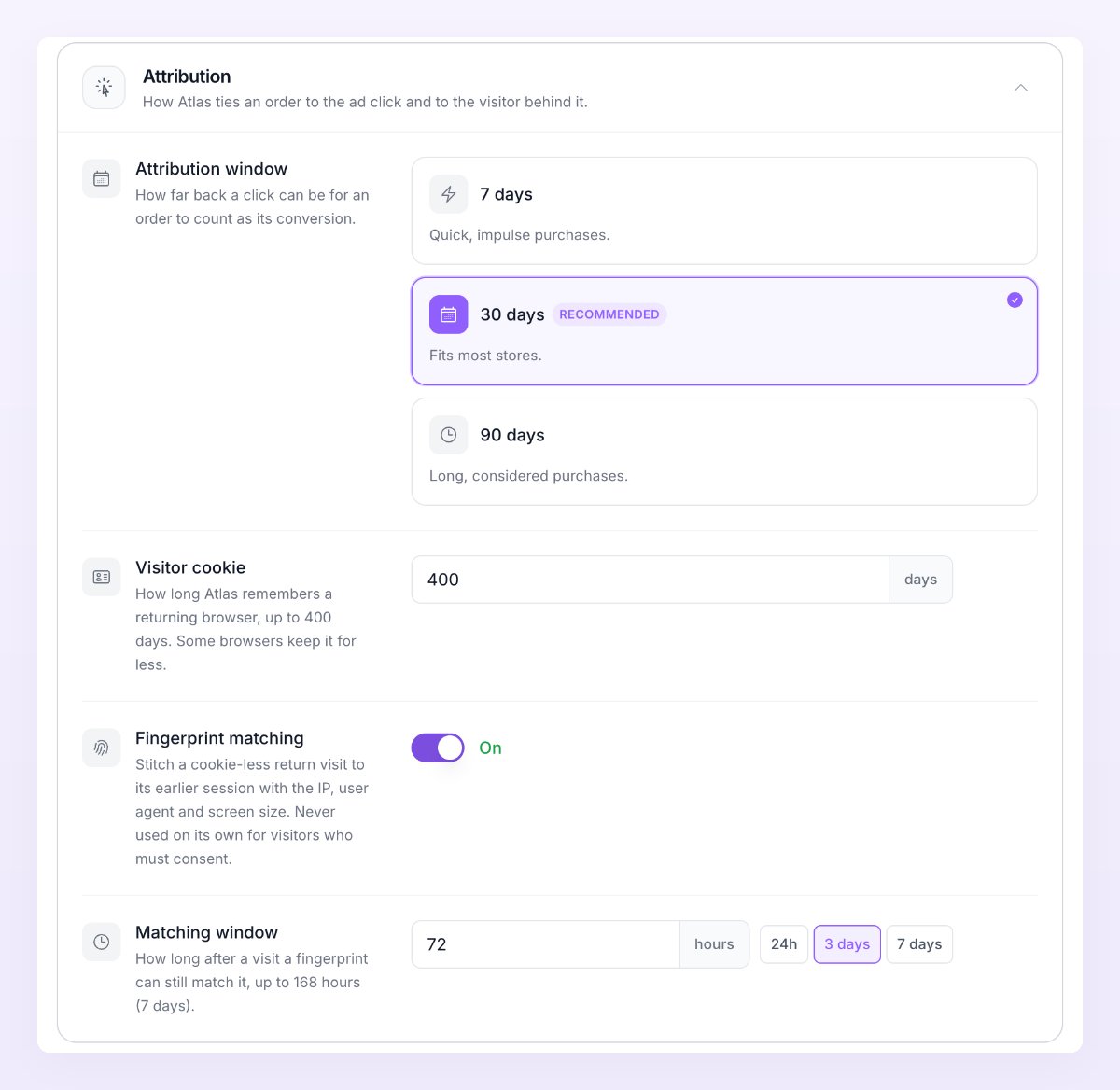
Meta Limited Data Use
Meta’s Limited Data Use flag asks Meta to limit how it uses an event’s data for people in US states with privacy laws. Atlas can set it on every event a Meta pixel sends, but there is no switch for it in the app. If you need it, contact support with the store and the Meta pixel, and it is turned on for you. Separately from that setting, a visitor from the US who has opted out of the sale of their data through your store’s privacy controls is always sent to Meta with Limited Data Use, whatever the pixel’s setting.Data deletion
- Shopify data erase requests. When a customer asks Shopify to erase their data, Atlas removes the personal data from their orders, deletes their customer and visitor records, and scrubs the IP address and user agent from their events and sessions. When a store asks Shopify to erase the shop’s data, every Atlas record of that store is deleted.
- Deleting a store. Delete Atlas store in the Danger zone of Store settings “Deletes the store’s tracking data, pixels, filters and connected ad accounts. Your affiliate data stays.” Pausing a store keeps its data; only deleting removes it.
- Retention. Delivery logs are kept for 90 days. Event history is kept for the length your plan includes; see Billing.
Related
Store settings
Attribution window, visitor cookie, consent and allowed domains.
Tracking script
Install the tracker on your own site and pass consent to it.
Events that need an identity
Why some events are skipped before they reach a platform.
Live activity
See skipped events and the consent reason on each row.