

Why tag your ads
Without UTMs, Atlas still knows a visit came from Meta or Google Ads (from the click id), but it cannot tell which campaign. Those conversions land in the Ad click without campaign UTMs row of Reporting instead of under the campaign, and the Ad center shows their revenue as Unmapped rather than beside the campaign’s spend. With the templates below, every click carries two things:- Names (
utm_campaign,utm_content,utm_term), which Reporting groups by. - Ids (
utm_id,adset_id,ad_id), which Ad center uses to match the order to the synced campaign, ad set and ad. Ids survive renaming; names do not. When ids are missing, Ad center falls back to matching the names against your campaign, ad set and ad names, and when that fails too the order is credited to the platform only.
The parameters Atlas reads
Click ids
Platforms add a click id to every ad click. Atlas reads it first, beforeutm_source, to decide the platform:
The click id is also what Atlas sends back to the platform with a conversion, so make sure nothing on your site strips it from the URL before the page loads. Taboola can only match conversions by click id, so Taboola ads must keep
tblci intact.
utm_source values
When there is no click id, Atlas readsutm_source. Upper or lower case makes no difference. These values are recognised:
Any other value, such as
newsletter, becomes its own source row in Reporting.
Meta
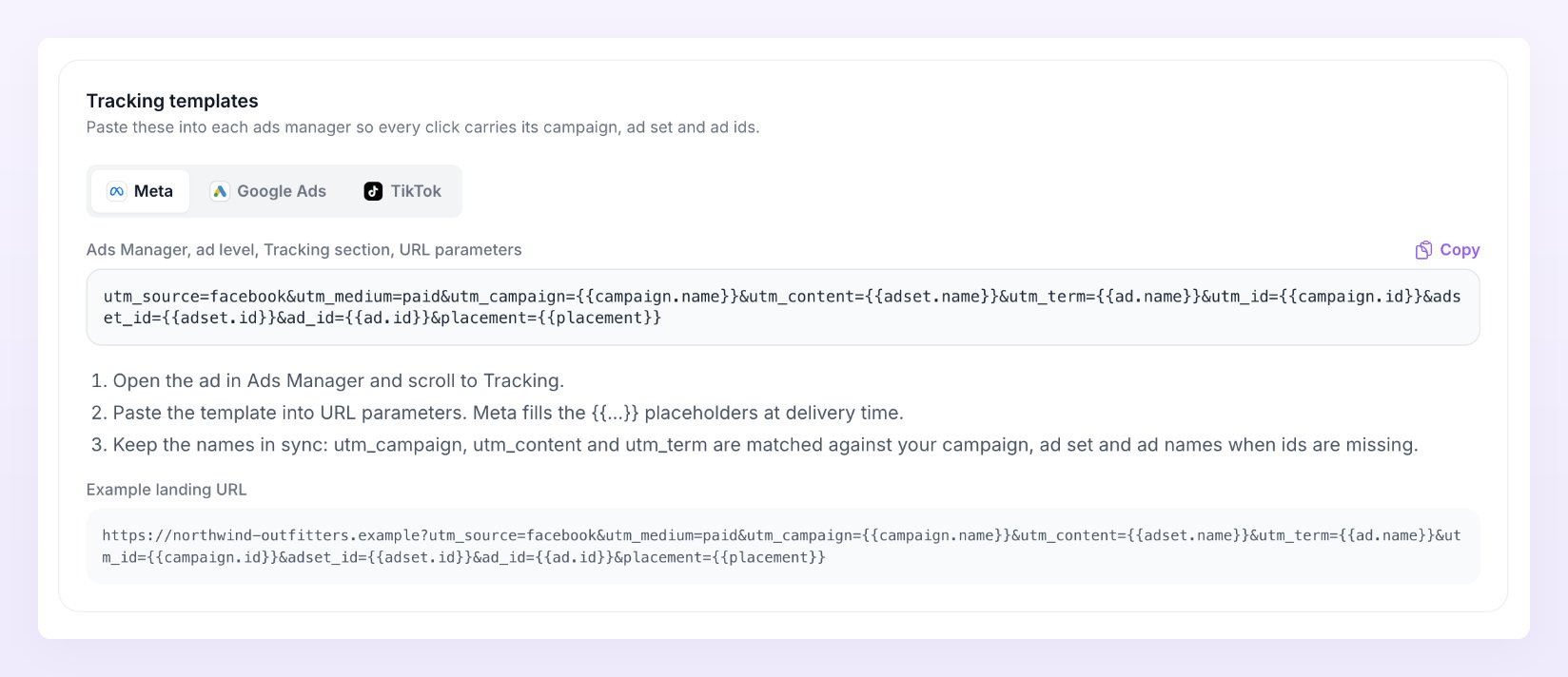
Paste this in Ads Manager, at the ad level, in the Tracking section, in URL parameters:- Open the ad in Ads Manager and scroll to Tracking.
- Paste the template into URL parameters. Meta fills the placeholders in double braces at delivery time.
- Keep the names in sync:
utm_campaign,utm_contentandutm_termare matched against your campaign, ad set and ad names when ids are missing.
utm_source=facebook for Instagram placements too; Atlas files both under Meta.
You can also copy each template from the Tracking templates card at the bottom of the Ad accounts page in Ad center: pick the platform tab, press Copy, and check the Example landing URL underneath to see what a tagged click looks like.
Google Ads
Paste this in Google Ads under Settings, Account settings, Tracking, in Final URL suffix, so every ad inherits it:- Open Google Ads, Settings, Account settings, Tracking.
- Paste the template into Final URL suffix.
{campaignid},{adgroupid}and{creative}are ValueTrack parameters; Google fills them at click time.
utm_campaign and utm_id: Ad center matches on the id either way.
For Google Ads, the template fills the campaign, ad group and ad with their ids. Reporting matches those ids to the campaigns it synced from your Google Ads account and shows the synced name; rows from an account you have not connected in the Ad center show the id itself.
TikTok
Paste this at the ad level in TikTok Ads Manager, appended to the Destination URL after the?:
- Open the ad in TikTok Ads Manager and edit the destination URL.
- Append the template to the URL. TikTok replaces the placeholders (the words between double underscores, such as
__CAMPAIGN_NAME__) at delivery time. - Campaign, ad group and ad names are used as a fallback when the ids are missing.
Other platforms
Atlas provides templates for the three platforms Ad center syncs. For Snapchat, Pinterest, Microsoft Ads, X, Reddit and Taboola there is no spend to match, but Reporting still groups their conversions by campaign when you add UTMs:- Set
utm_sourceto one of the values above so the platform is recognised even if the click id is lost. - Put the campaign, ad set and ad names (or the platform’s own placeholders for them) in
utm_campaign,utm_contentandutm_term. - Keep the platform’s click id in the URL: it identifies the platform and is sent with each conversion.
Check your mapping
The Mapping health card on the Ad accounts page in Ad center tells you how many paid clicks carry the ids Ad center needs. Its subtitle reads “How many paid clicks carry the ids Ad center needs to credit the right campaign, ad set and ad.” The headline is a percentage “of” your paid clicks “in the last 30 days” that “carry campaign, ad set and ad ids”, shown per platform: green at 80% or more, amber from 40%, red below that. Under it, an Orders line splits your paid orders into matched by id, matched by name, platform only, and with no paid click.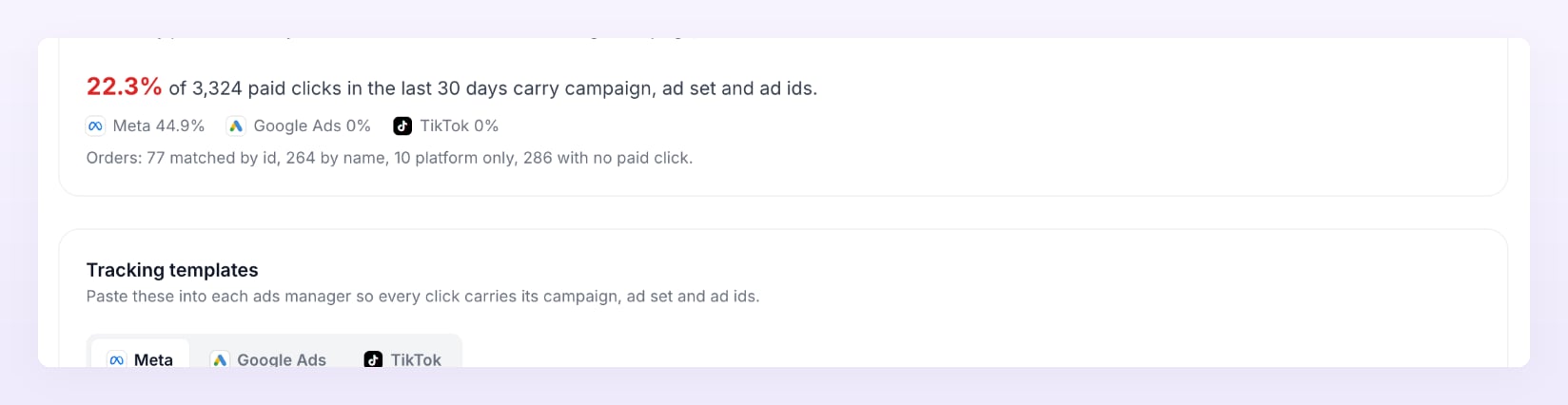
- Mostly matched by id: the templates are in place. Nothing to do.
- Mostly by name: clicks carry names but not ids. Paste the full template, not only the UTM names, and avoid renaming campaigns while they run.
- Many platform only: clicks have a click id but no usable UTMs. Add the template for that platform.
- Many with no paid click: these orders had no paid visit inside the lookback window. They are organic, affiliate or direct, or the click id was stripped on the way to your site.
Related
Reporting
Conversions by campaign, ad set and ad, next to what each platform reported.
Connect ad accounts
Sync spend, campaigns and ads from Meta, Google Ads and TikTok.
Campaigns in Ad center
Spend beside revenue per campaign, with Unmapped and Unattributed rows explained.
Event filters
Send events only when a UTM, country, value or product matches a rule.