

What Atlas records
Atlas starts recording the moment a visitor lands on your site. The tracking script, the Shopify app or the WooCommerce plugin sends Atlas:- The visit: the landing page, the referrer, every UTM parameter, and the click ids ad platforms add to their links (fbclid, gclid, ttclid and the others).
- A visitor id: a first-party cookie that lasts up to 400 days, so a return visit next month still belongs to the same person.
- Site and checkout events: page views and product views are tracked for you. Adds to cart, checkouts started, add payment info and search arrive from your platform or from a call in your site’s code.
- Identity: an email or phone when the visitor signs up, logs in or checks out, which Atlas hashes before it stores it.
- Orders and conversions: paid orders from Shopify, WooCommerce, Stripe and the other billing tools, plus leads, sign ups, trials and subscriptions. See Events Atlas sends and Leads, sign ups, trials and subscriptions.
Where the data goes
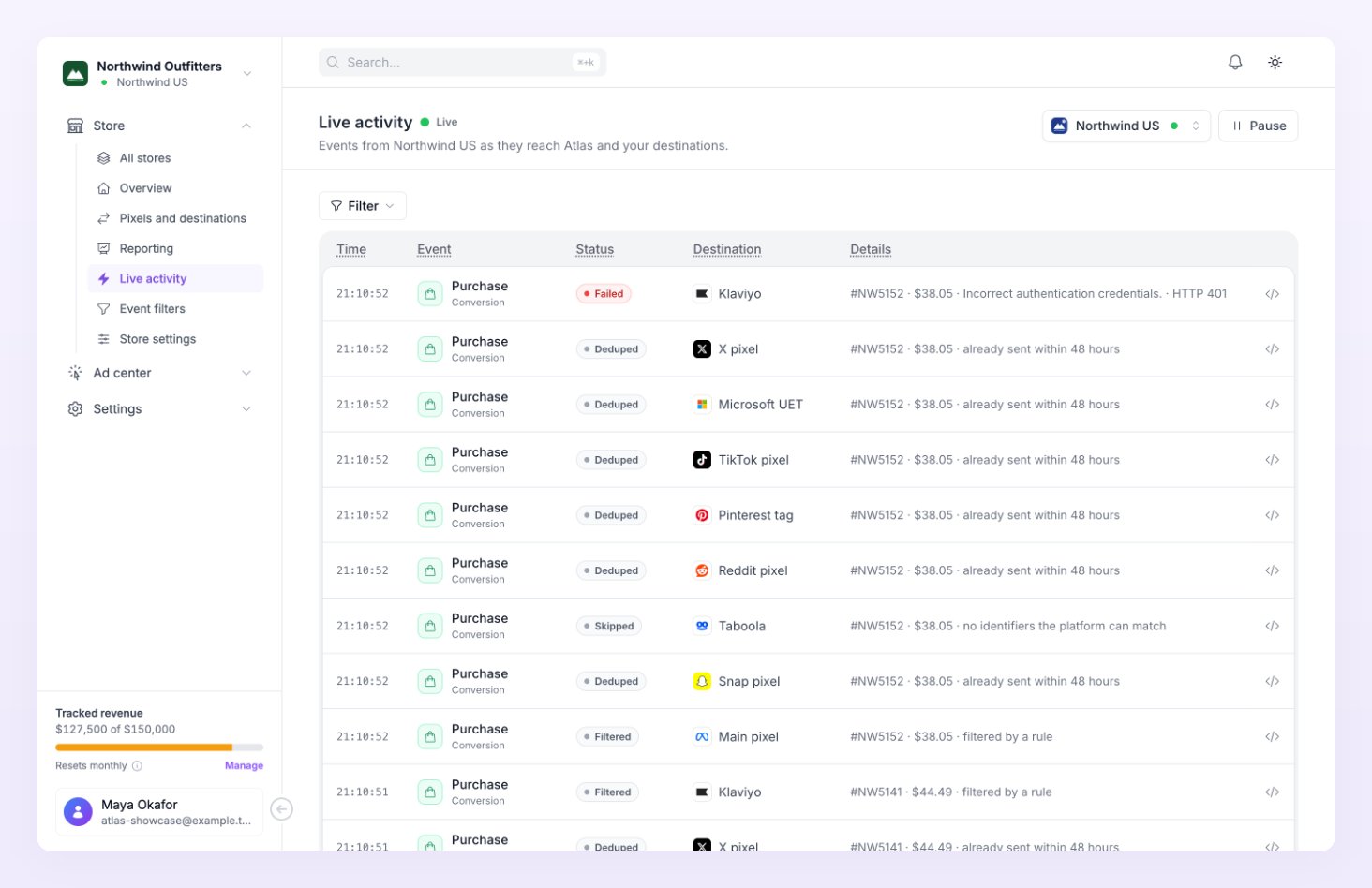
Each store has one or more pixels: a Meta pixel, a Google Ads conversion, a TikTok pixel and so on, each with its own ids and access token. When an order or conversion arrives, Atlas runs it through every enabled pixel, in this order:- Is the pixel on, and is this event turned on for it? You choose the events per pixel under Pixels and destinations.
- Did the visitor consent? Visitors who declined marketing cookies are never sent. In the EEA, the UK and Switzerland, visitors who never answered your banner are skipped unless you change the store’s consent setting. See Consent and privacy.
- Does an event filter stop it? Store-wide rules run first, then the pixel’s own rules. See Event filters.
- Is there something the platform can match? A hashed email or phone, the platform’s cookie or click id, or an IP address and user agent. Without any of them the event is skipped as “no identity to match”.
- Was it already sent? Atlas sends each event once per pixel and skips repeats within 48 hours.
How an order is matched to a visit
An order arrives from your platform with whatever it carries: a cart token, a cookie value, an email, a customer id. Atlas tries its matching methods in order and keeps the first that works: the Shopify cart attribute, the cart token, the Atlas cookie, the email, the phone, the Shopify or Stripe customer id, then a fingerprint match on network and browser details within a short window. The method used shows in the Match column of the Overview’s Recent orders table, and the list is explained under Match types. Email and phone matching work across devices: a visitor who clicked an ad on their phone and bought on a laptop is still one person once both sessions have identified with the same email.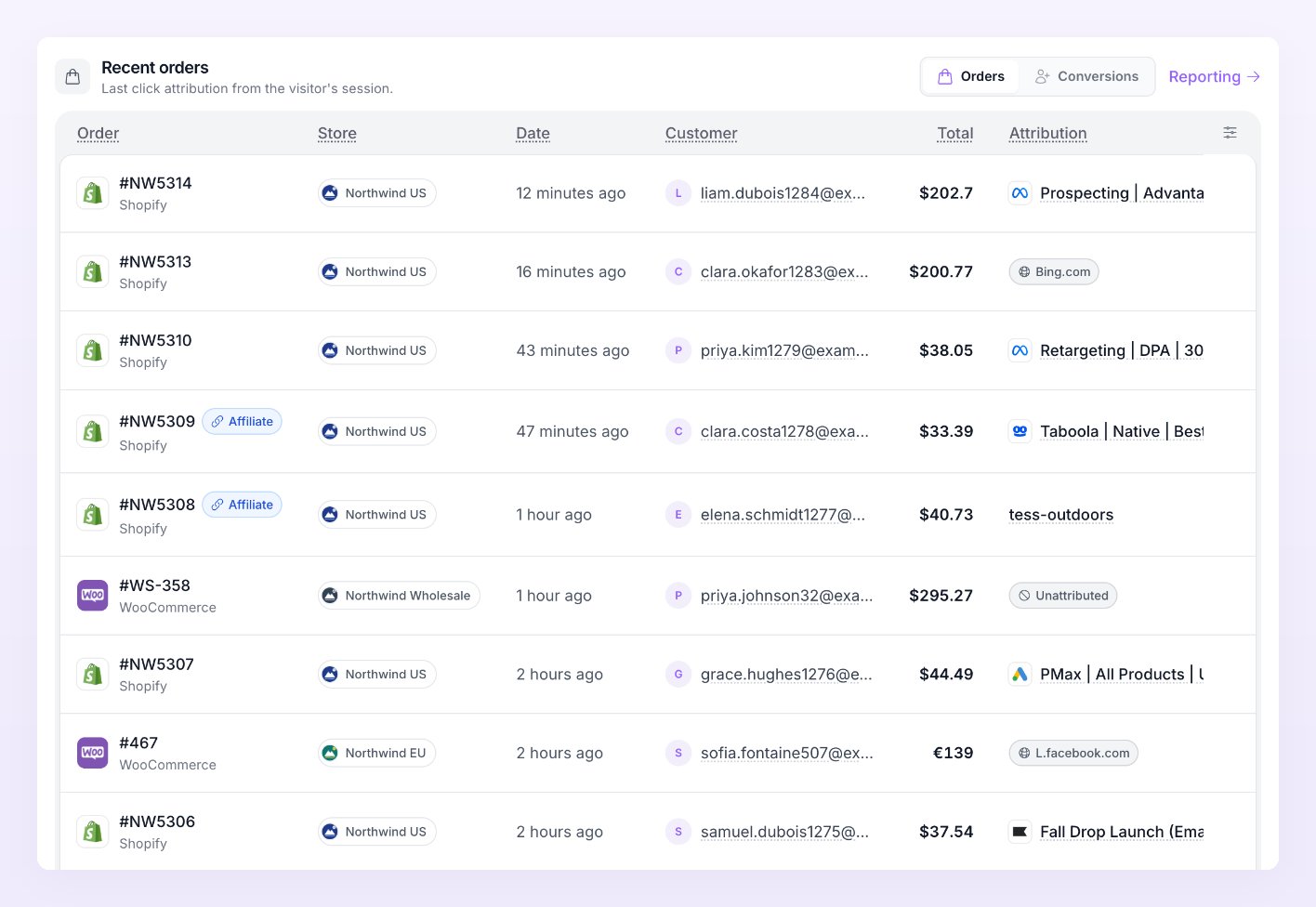
How a sale is attributed to a campaign
Once the order belongs to a visitor, Atlas looks back through that visitor’s sessions inside the store’s attribution window (7, 30 or 90 days, 30 by default) and credits the sale to the last qualifying touch. A session with an ad click id counts more than one with only UTM parameters, which counts more than one with a plain referrer. If nothing qualifies, the sale is Direct. The campaign, ad set and ad come from the UTM parameters on that session:utm_campaign, utm_content and utm_term. The platform comes from the click id first, then from utm_source. This is why tagging your ads matters: see Tag your ads with UTMs. The result is what the Reporting page shows.
The Ad center uses a stricter version of the same idea: it matches the last paid click within 7 days to the campaigns it synced from your ad accounts, by id first and by name second, so ad spend and tracked revenue line up row by row.
What is hashed before it leaves
Atlas never sends an email address or phone number in the clear. Before an event leaves Referly’s servers, these are lowercased, trimmed and hashed with SHA-256, the format every platform asks for: email, phone (in international format), first name, last name, city, state, postcode, country and the customer id. The platform’s own cookies and click ids, the IP address and the user agent are sent as they are, because the platforms match on them directly.What you see in Atlas
What Atlas never does
- It never changes a campaign, a budget or an ad. Ad account access is read-only.
- It never sends events from a paused store, a test-mode order, or a visitor who declined consent.
- It never touches your affiliate program’s customers, sales or commissions.
- It never sends the same event twice to the same pixel within 48 hours.
Related
Add a store
Connect your site and start recording.
Pixels and destinations
Add the platforms you advertise on.
Statuses and labels
Every status Atlas shows, explained.
Consent and privacy
What is sent, what is hashed, and when consent applies.