

Why an event gets counted twice
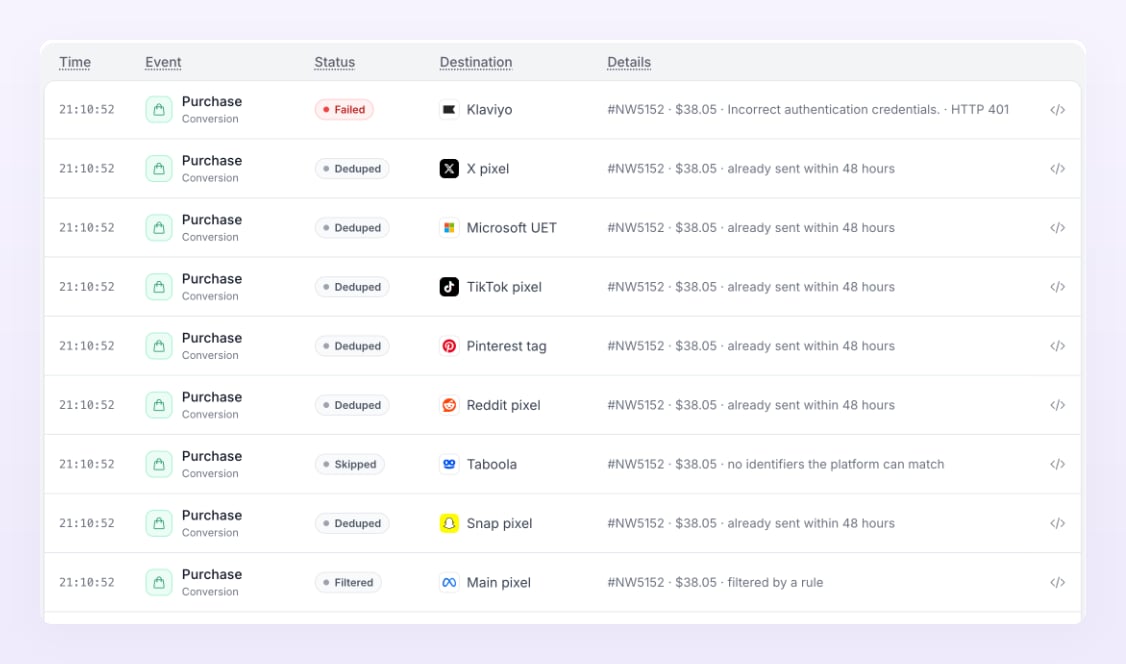
An ad platform counts whatever reaches it. A purchase can reach Meta from the browser pixel on your thank-you page, from Shopify’s Facebook & Instagram app, and from Atlas’s server-side send: three reports of one sale. Platforms merge reports only when they carry the same event id, which is how Atlas and Shopify work together on Meta, or when you remove the extra sources. Atlas itself never double-sends: a second copy of the same event for the same pixel within 48 hours is logged as Deduped in Live activity and not sent.Shopify and Meta
Shopify’s Facebook & Instagram app sends purchases to Meta with Shopify’s own event id. Atlas sends the same purchase with the same id, so Meta recognises the pair and keeps one. You have two ways to run this:- Keep both sources and let Meta deduplicate. Leave the Facebook & Instagram app’s customer data sharing on. Meta merges the browser event and the Atlas server event by their shared id, and keeps the richer one. This gives Meta the browser signals as well as the server ones. Check in Events Manager that your purchases show as deduplicated rather than as two separate counts.
- Make Atlas the only source. In the Facebook & Instagram app in Shopify, turn off customer data sharing. Meta then hears about purchases only from Atlas. Pick this if you prefer one clear pipeline, or if you see duplicates in Events Manager that do not merge.
Shopify and every other platform
TikTok, Snapchat, Pinterest, Microsoft and Reddit do not share an event id with Atlas on Shopify. Once the Atlas pixel for a platform is live, remove that platform’s native pixel from your theme or its Shopify sales channel app, or turn off its purchase events. Keep one source per platform.Google Ads
Google Ads conversions from Atlas fire in the browser through the tag Atlas builds for you. If Google’s own conversion tag, Google Tag Manager or the Google & YouTube app in Shopify also fires the same conversion action, Google counts it twice. Keep only one of them per conversion action. The Google Ads pixel guide shows the Shopify custom pixel setup; replace the code in the existing custom pixel rather than adding a second one.Your own script and the Atlas snippet
On a custom site, if your developer already calls the platform’s browser pixel for purchases, either remove that call or keep it and make sure Atlas’s event carries the same order id: Atlas uses the order id as the event id for purchases and the conversion id for leads, sign ups, trials and subscriptions, which Meta and TikTok use to merge duplicates. The simplest setup is one source: let the tracker and Atlas handle it.Dynamic checkout buttons
Shopify’s dynamic checkout buttons (Buy it now, Shop Pay express) skip the cart, so no Add to cart event fires for those buyers while the purchase still does. Your funnel then shows more purchases than carts for part of your traffic. Turn the buttons off on product pages if you optimise on add-to-cart events, or accept the gap.Atlas’s own 48 hour dedupe
Atlas keys every send on the event, the pixel and the order or conversion id. A repeat within 48 hours, for example an order webhook that Shopify retries, or a thank-you page that reloads, is logged as Deduped and not sent again. Reports from the browser also wait a minute for the server copy of the same order so the platform receives one enriched event rather than two.How to check
- Send a test purchase, then open the platform’s events manager and look at how many purchase events it received for that order.
- Open Live activity in Atlas, filter to Sent, and confirm exactly one Sent row per pixel for the order.
- On Reporting, compare the platform’s reported purchases with Atlas’s count in the platform column: a platform that claims far more purchases than Atlas tracked is usually counting twice.
Related
Meta Ads pixel
Event ids, event mappings and the Shopify dedupe.
Google Ads pixel
The browser-fired tag and the Shopify custom pixel.
Reporting
What the platform reported beside what Atlas tracked.
Statuses and labels
Sent, Deduped, Skipped and the other delivery statuses.