Source Tracking for Affiliates, Referrals, and Sales
You can now see exactly how every affiliate, referral, and sale was created. A new Source field is tracked across all three record types and displayed in your dashboard tables, affiliate sidebar, and notification emails.
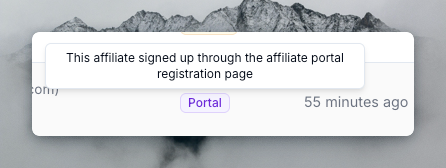
How it works
Every time an affiliate signs up, a referral is recorded, or a sale is logged, Referly automatically tags the record with its origin. The source appears as a badge in your dashboard and in the notification emails you receive.
If a record was created before this feature was introduced, it will show as Unknown.
Affiliate Sources
- API — The affiliate was created via the Referly REST API (v1).
- Widget — The affiliate signed up through the affiliate widget embedded on your website.
- Manual — The affiliate was manually created from the admin dashboard.
- Imported — The affiliate was imported from a CSV or spreadsheet upload.
- Portal — The affiliate signed up through the affiliate portal registration page.
- Unknown — The source was not tracked (applies to records created before this feature).
Referral Sources
- API — The referral was created via the Referly REST API (v1).
- Integration — The referral was created automatically through an integration (Stripe, Shopify, Zapier, etc.).
- Manual — The referral was manually added from the admin dashboard.
- Imported — The referral was imported from a CSV or spreadsheet upload.
- Affiliate Submitted — The referral was submitted by an affiliate through the affiliate portal.
- Unknown — The source was not tracked (applies to records created before this feature).
Sale Sources
- API — The sale was recorded via the Referly REST API (v1).
- Integration — The sale was recorded automatically through an integration (Stripe, Shopify, Zapier, etc.).
- Manual — The sale was manually added from the admin dashboard.
- Imported — The sale was imported from a CSV or spreadsheet upload.
- Unknown — The source was not tracked (applies to records created before this feature).
Where you'll see it
- Dashboard tables — The Affiliates, Referrals, and Transactions tables each have a new Source column. Hover over any source badge to see a detailed explanation.
- Affiliate sidebar — The affiliate detail sidebar shows the source alongside commission plan, earnings, and payout method info.
- Notification emails — Admin and affiliate notification emails now include a "Source: ..." badge showing how the record was created.