Exclude Tax and Shipping from Commission Calculation
You can now choose to exclude tax and shipping from the revenue used to calculate affiliate commissions. This ensures affiliates earn commissions on the actual product value, not on fees that don't reflect your margin.
How It Works
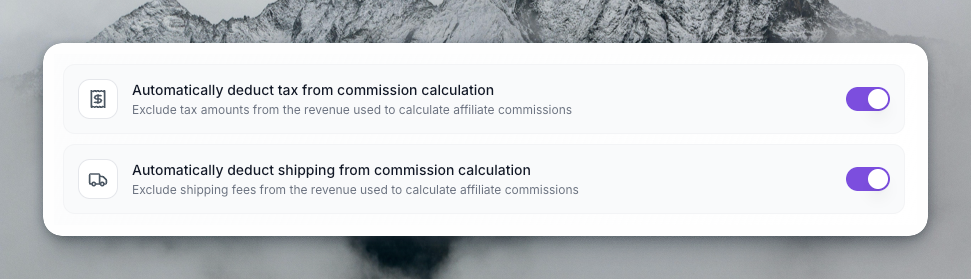
Two program-level toggles in Advanced Settings let you control this per program:
- Automatically deduct tax from commission calculation — Excludes tax amounts from the revenue base used for commission math
- Automatically deduct shipping from commission calculation — Excludes shipping fees from the revenue base
Both default to on. Toggle them off if you prefer to calculate commissions on the full order amount (including tax and shipping).
Integration Impact
No Action Required: Stripe, Shopify, Paddle, Chargebee, Zylvie, Skillplate, and API
For these integrations, we automatically extract tax and shipping from the payment or checkout data. Nothing changes on your side — the feature works immediately as soon as the platform receives the sale.
| Integration | How tax/shipping is handled |
|---|---|
| Stripe | Extracted from invoice tax and checkout session totals |
| Shopify | Extracted from checkout totals (process-checkout, orders-paid) |
| Paddle | Extracted from Paddle webhook payload |
| Chargebee | Extracted from Chargebee invoice data |
| Zylvie | Extracted from Zylvie webhook data |
| Skillplate | Extracted from Skillplate webhook data |
| API | Pass tax and shipping in your request if needed |
WooCommerce: Update Your Plugin
The WooCommerce integration uses a WordPress plugin that sends sale data to our capture API. To support tax and shipping deduction, the plugin must send tax and shipping in the request payload.
Action required: Download and install the new version of the PushLap Growth WooCommerce plugin. Older versions do not include tax and shipping, so commissions will continue to be calculated on the full order amount until you update.
After updating, the plugin will send tax and shipping with each captured sale, and the deduction toggles will take effect for your WooCommerce program.
Where to Configure
- Go to Settings → Program Details
- Expand Advanced Settings
- Find the Commission Deduction section
- Toggle “Automatically deduct tax from commission calculation” and “Automatically deduct shipping from commission calculation” as needed