

The seven parts
The map at the top of the page shows every part with how many of its steps are done. Select a part to open it; one part is open at a time.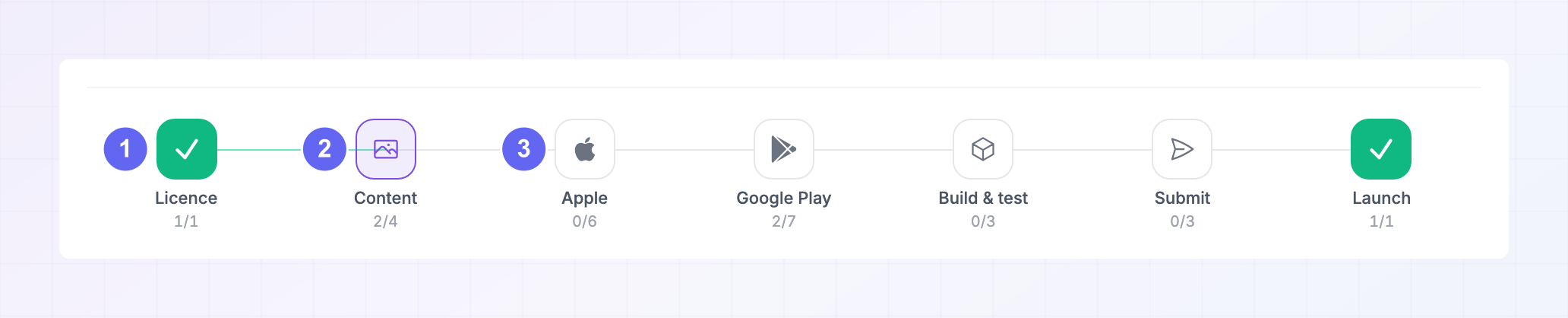
- A finished part turns green.
- The part to work on next is highlighted.
- Parts you haven’t started show how many steps they have.
Every step inside a part says who does it, roughly how long it takes, and links to the matching guide. A step marked No automatic check is one Apple or Google doesn’t let Referly see; it ticks itself off once a later step proves it.
What Referly does and what you do
Your app is published under your own Apple and Google accounts, so your business is the seller on both stores. Referly never asks for your Apple or Google password. You create keys once, upload them, and Referly works with those.The order that works
Start the two developer accounts first: both stores check your company, and that’s the slowest part.- Apply for both developer accounts on day one. Apple can take up to two weeks if your company still needs a D-U-N-S number; Google’s check usually takes a few days.
- While you wait, finish the Content part and buy the licence.
- When Apple approves you, connect Apple, register the bundle ID and create the app record.
- When Google approves you, create the app, save the package name, build and upload the first Android file, then connect Google Play.
- Build a test version, install it, and send yourself a test notification.
- Finish both store pages, build the store version and submit.
- Launch when both stores approve.
How long it takes
Client apps for agencies
An agency’s client app (the branded admin app your clients use) goes through the same seven parts with a few differences:- The licence is the Client app licence.
- The store reviewers sign in as a view-only team member of one client program you pick. See Reviewer sign-in.
- You send the test notification to yourself by signing in to the test app with your own Referly login.
- The launch kit has no portal banner or email badges. Your clients see the app on their dashboard’s Mobile App → Download Mobile App page as soon as it’s live.