

Find your tax forms
Open Settings in the left sidebar of your affiliate portal, choose the Payouts tab, then Tax Forms. The tab is always there, even before a program has asked you for anything. If nothing has been requested yet, you’ll see No tax forms requested. A request shows up here as soon as the program sends it.When a program requests a form
You hear about a new request in two places:- In your portal. A Tax form requested notification appears in the bell at the top right. Select it to go straight to the Tax Forms tab. See Notifications.
- By email. The program emails you to say it has requested a tax form, naming the form it needs, with a Fill out button (for example Fill out W-9) that opens the Tax Forms tab.
- The program’s name and the form it needs: W-9, W-8BEN, or W-8BEN-E.
- A status: Action required until you send the form, then Submitted.
- Requested and the date the request was sent.
- Note from the program, if they added one.

Which form you’re asked for
The program chooses which form to request. As a general guide:
If you think you’ve been sent the wrong form, message the program through Messages in the left sidebar before you fill it out.
Fill out the form
Select Fill out form on the request. The form opens inside the card. Fields marked with a red asterisk are required, and the fields you see depend on the form.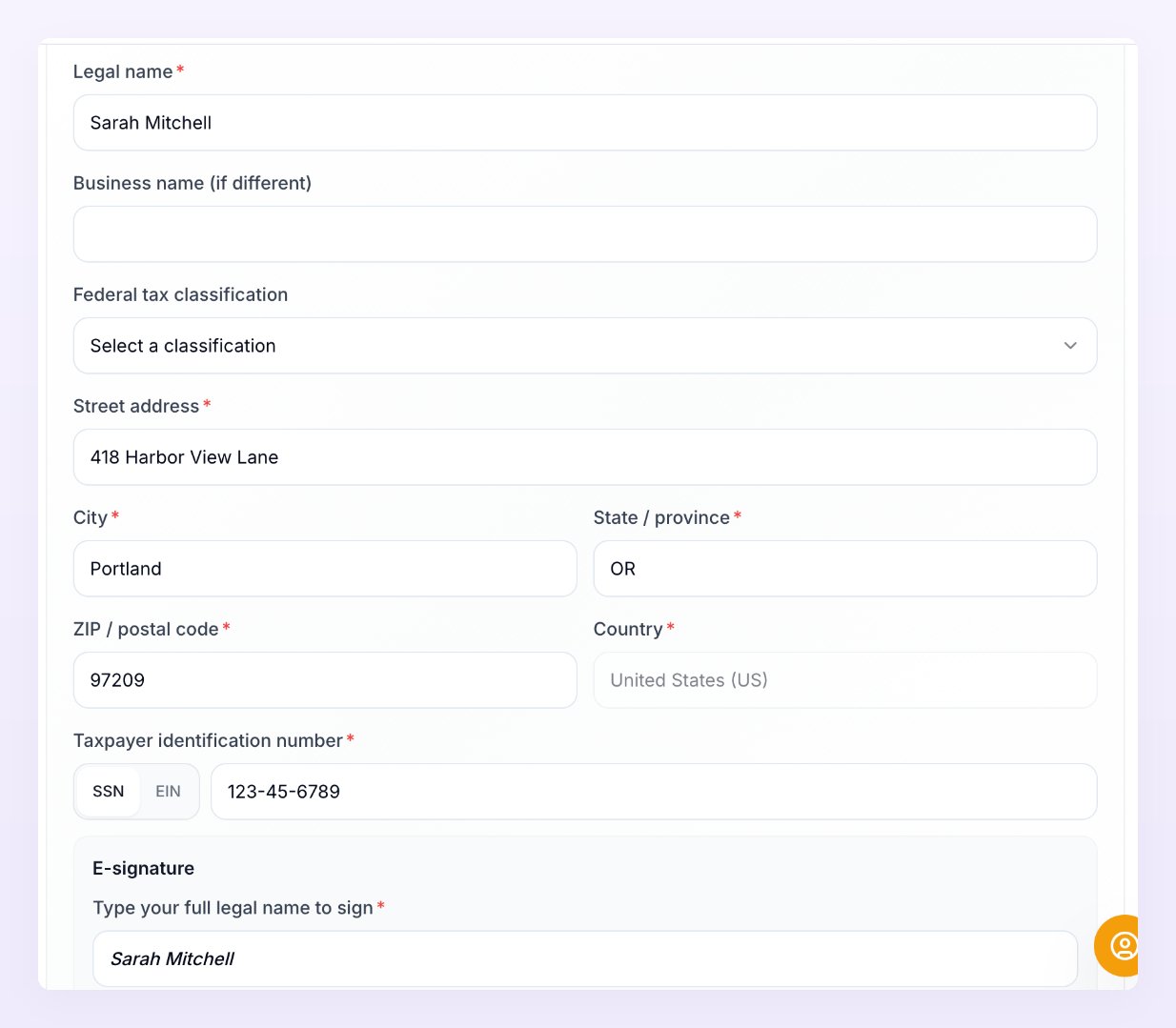
W-9
- Legal name, and Business name (if different) if you trade under another name.
- Federal tax classification, for example Individual/sole proprietor, C corporation, S corporation, Partnership, Trust/estate, one of the LLC options, or Other.
- Your address: Street address, City, State / province, and ZIP / postal code. Country is already set to United States (US).
- Taxpayer identification number. Choose SSN or EIN, then enter the number. A W-9 can’t be sent without it.
W-8BEN
- Legal name and Country of citizenship.
- Your address: Street address, City, State / province (optional), ZIP / postal code, and Country. Type the country, for example
DE. - Your tax number: Foreign tax identifying number and Country that issued the tax number, or your Date of birth. You need to give one or the other.
W-8BEN-E
- Legal name of entity, and Disregarded entity name (if any).
- The entity’s address: Street address, City, State / province (optional), ZIP / postal code, and Country.
- Foreign tax identifying number and Country that issued the tax number, if you have one.
Claim tax treaty benefits
This option is on the W-8BEN and W-8BEN-E only. If your country has a tax treaty with the US, you can claim a reduced withholding rate. Tick Claim tax treaty benefits, then fill in the Treaty country, Treaty article, Withholding rate (%), Type of income, and Reason for eligibility.Sign and submit
Under E-signature, type your full legal name in Type your full legal name to sign. By signing, you certify under penalties of perjury that the information on the form is true, correct, and complete. Select Submit form. You’ll see Tax form submitted, and the request changes to Submitted. If the form won’t send, the message tells you what’s missing:- Please fill in all required fields: a field with a red asterisk is still empty.
- A taxpayer identification number is required for this form: a W-9 needs your SSN or EIN.
- Provide a foreign tax ID and its country, or your date of birth: a W-8BEN needs one of these.
Download a copy of your form
Once you’ve submitted, the card shows a summary: your Legal name, Country, Tax ID (only the last four digits), the date it was Signed, and the Form revision. Select Download form (PDF) to save the official IRS form, filled in with the details you submitted. It’s worth keeping a copy with your own tax records.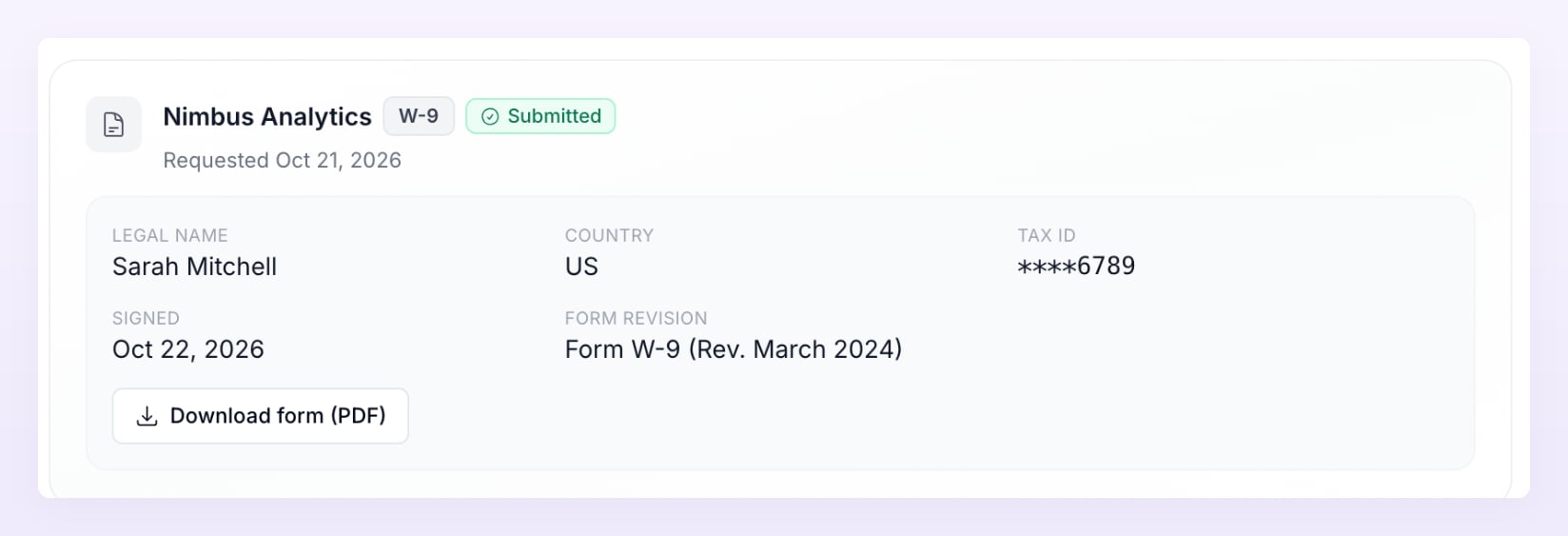
When a W-8 form expires
W-8 forms expire on December 31 of the third year after you sign them. A W-9 has no expiry date. While a W-8 is still valid, its card shows Expires and the date. Once that date has passed, you’ll see Expired, please submit a new form with a Submit a new form button. Select it, fill in the form again with your current details, and sign and submit it as before.How your information is protected
- Your tax ID is encrypted the moment you submit it, and it’s never stored or displayed in full.
- The program sees only the last four digits. Any time the full number is accessed, that access is logged.
- No document copies are stored. Your form exists only as encrypted data, and the PDF is created when you download it.
This page explains how to use the Tax Forms tab. It isn’t tax advice. If you’re not sure which form applies to you or how to answer a question on it, check with an accountant.
Related
How you get paid
Follow a reward from referral to payout and see what each status means.
Invoice details
Add the details that appear on the invoices for your payouts.
Cash payouts
Choose how you receive money and add your payment details.
Notifications
Catch up on requests and updates from your programs.