> ## Documentation Index
> Fetch the complete documentation index at: https://www.referly.so/docs/llms.txt
> Use this file to discover all available pages before exploring further.
# Sharetribe
> Connect Sharetribe to Referly to track marketplace signups, purchases and bookings and pay affiliates per sale. Step-by-step Integration API setup, automatic link tracking with Referral sources, commission base and cancellation handling.
Sharetribe is a hosted marketplace platform, and it works differently from most of the platforms Referly connects to: it has no webhooks. Instead of waiting to be told about a sale, Referly signs in to your marketplace with its own credentials and checks for new signups, transactions and cancellations about once a minute.
That makes the setup unusually short — there's no endpoint to create and nothing to keep in sync. Affiliates just share their links: Sharetribe's built-in **Referral sources** feature notices the link on any page of your marketplace, remembers it in the visitor's browser for 90 days, and saves who referred them when they sign up. Nobody types a code and nobody writes code — you switch the feature on once in Console.
 ## What the Sharetribe integration can and can't do
| What you want to track | Does Sharetribe cover it? |
| ---------------------------------------- | -------------------------------------------------------------------------------------------------------------------------------------------------------------------------------------------------------------------------------------------------------------------- |
| **Signups** | Yes — a new user carrying a referral is recorded against the affiliate who sent them, before any money moves. |
| **Purchases** | Yes — recorded once the payment is confirmed, with the amount, the listing and the currency. |
| **Bookings** | Yes — recorded once the booking is accepted, whether the provider accepted it or you did as the operator. |
| **Listing-level commission rules** | Yes — rules can target individual listings, so different listings can carry different rates. |
| **Commission on your marketplace fee** | Yes — you choose whether commission is worked out on the whole order or on your take alone. See [Step 3](#step-3-choose-what-commission-is-based-on). |
| **Cancellations, declines and expiries** | Yes — each one reverses the commission automatically. |
| **Custom transaction processes** | Yes — the default purchase and booking processes work out of the box, and you can add your own transition names. See [Custom transaction processes](#custom-transaction-processes). |
| **Discount code attribution** | No — Sharetribe has no discount-code system, so attribution runs on affiliate links, which Sharetribe captures automatically. |
| **A discount code per affiliate** | No, for the same reason. |
| **Subscription renewals** | No — Sharetribe transactions are one-off, so there's nothing recurring to follow. |
| **Commission before tax** | No — Sharetribe orders carry no separate tax line, so commission is worked out on the order total. |
| **Commission before shipping** | No — shipping is part of the order total and isn't deducted. |
| **Partial refunds** | No — Sharetribe's Stripe integration only issues full refunds, so a reversal is always the whole commission. |
| **Click tracking** | Not on a Sharetribe-hosted marketplace — it can't run a tracking script, so clicks are only counted if you turn on Referly short links or run a custom-coded site. Referrals and sales are tracked either way. See [Do clicks get tracked?](#do-clicks-get-tracked). |
| **Instant tracking** | No — because there's no webhook, signups and sales appear within about a minute rather than the same second. |
## Which setup do you have?
Every marketplace captures referrals the same way — through Sharetribe's Referral sources feature in [Step 4](#step-4-turn-on-referral-sources). The only difference is an optional extra:
Your marketplace is hosted by Sharetribe and you build it in Console. Referral sources is all you need — affiliate links are tracked automatically with no code at all.
You run the Sharetribe Web Template on your own hosting. Referral sources works exactly the same, and you can additionally run the Referly tracking script for click-level analytics.
## Before you start
You'll need:
* **Admin access to Sharetribe Console**, so you can create an Integration API application and edit your user types.
* **A developer**, only if you want the optional tracking-script extras on a custom-code template. The core setup needs no code at all.
* **Your Referly program open.** Go to your program, then **Settings**, then **Integrations**, and choose **Sharetribe**.
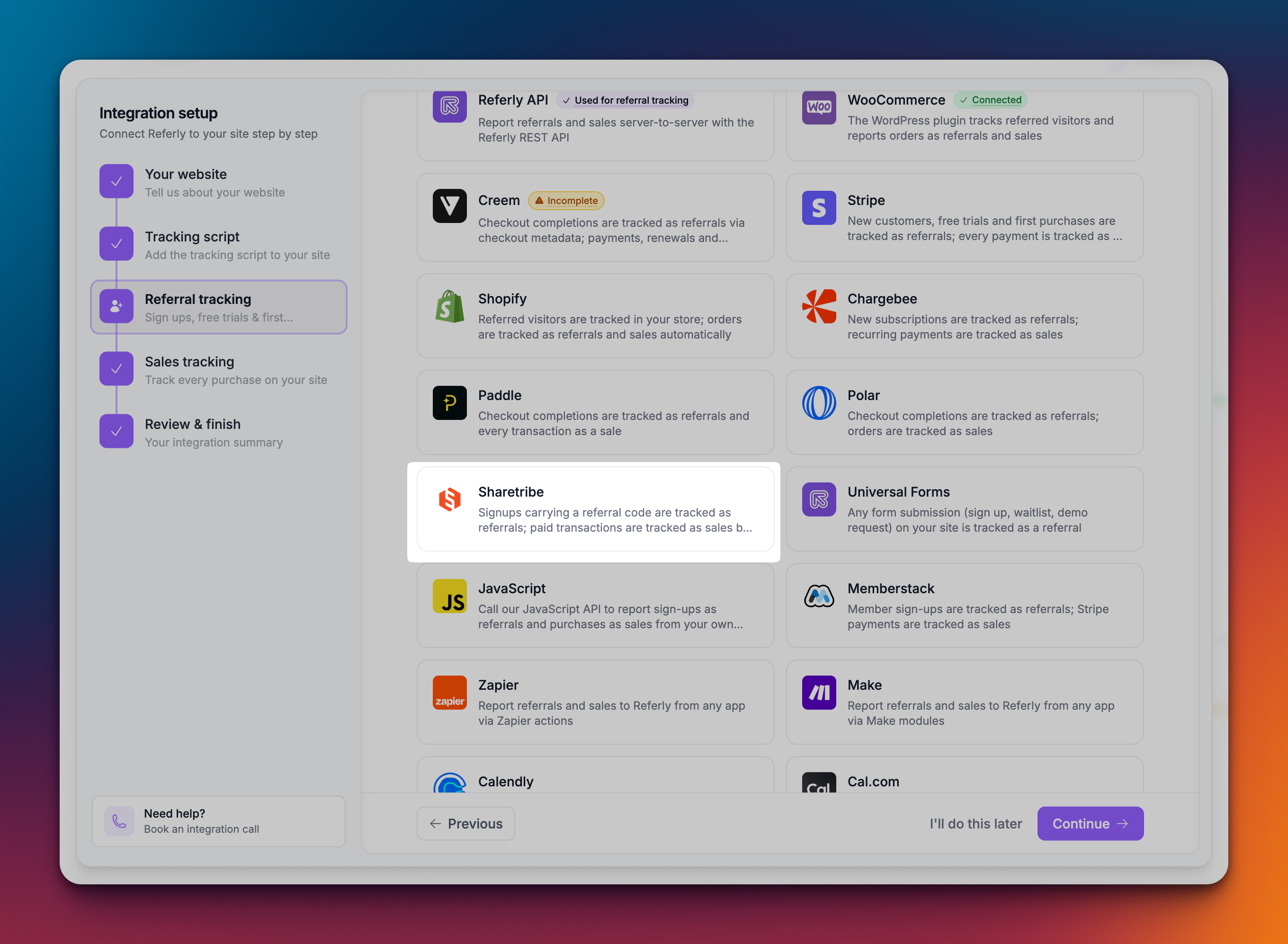
Every Sharetribe environment — Live, Test and Dev — has its own Integration API credentials. Connect your Test environment first and rehearse the whole flow, then swap in your Live credentials when you're happy.
## Step 1: Create an Integration API application in Sharetribe
This is what lets Referly read your marketplace.
In Sharetribe Console, go to **Build**, then **Advanced**, then **Applications**.
Choose **Integration API** as the type — not the Marketplace API. Give it a name you'll recognise later, such as "Referly".
Copy the **Client ID** and the **Client Secret**. The secret is shown only once, when the application is created, so copy it now — if you lose it you'll need to create a new application.
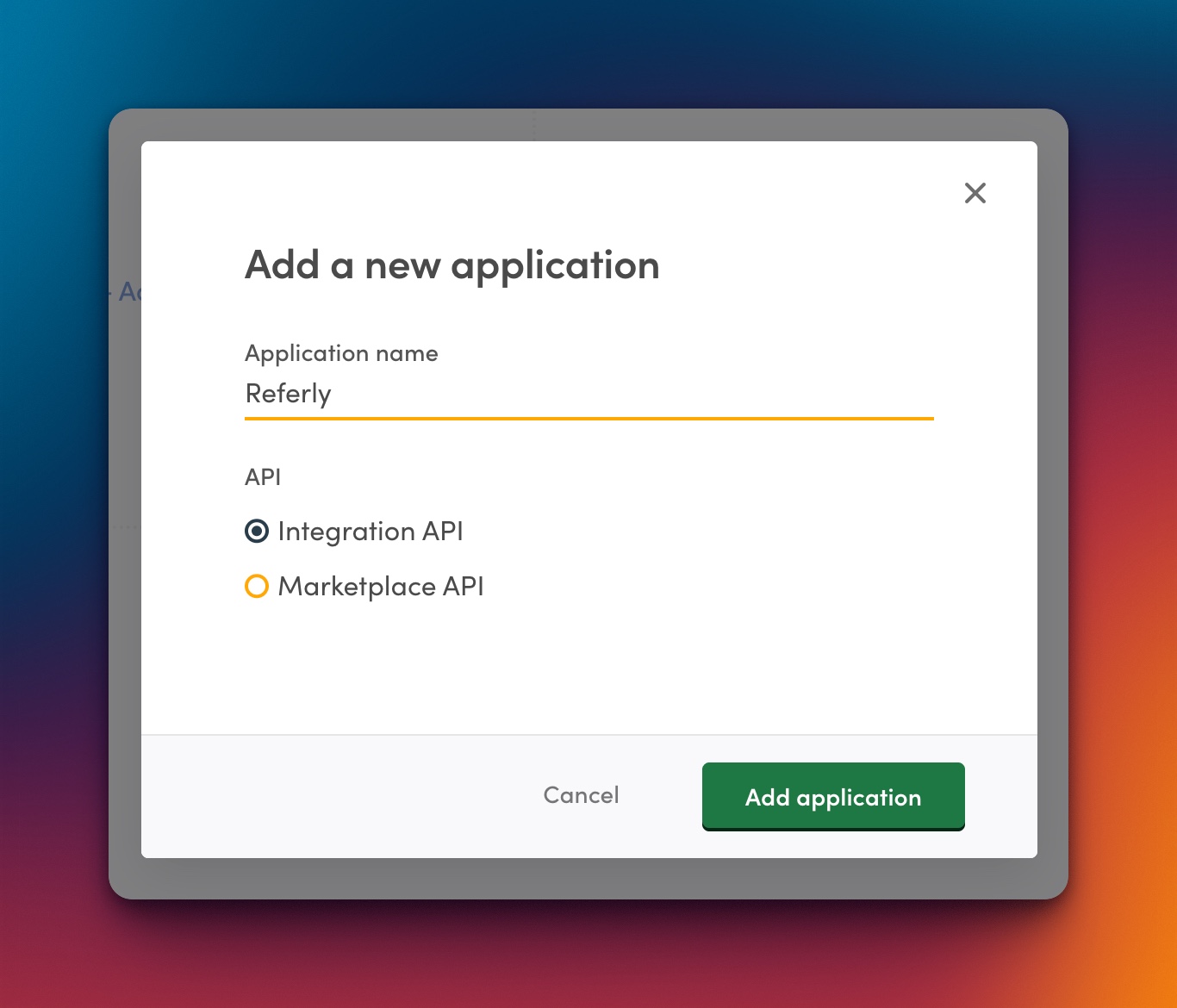
Make sure you're in the right environment before you create the application. Credentials from your Test marketplace only ever see Test data, and credentials from Live only see Live data — they aren't interchangeable.
## Step 2: Connect Sharetribe in Referly
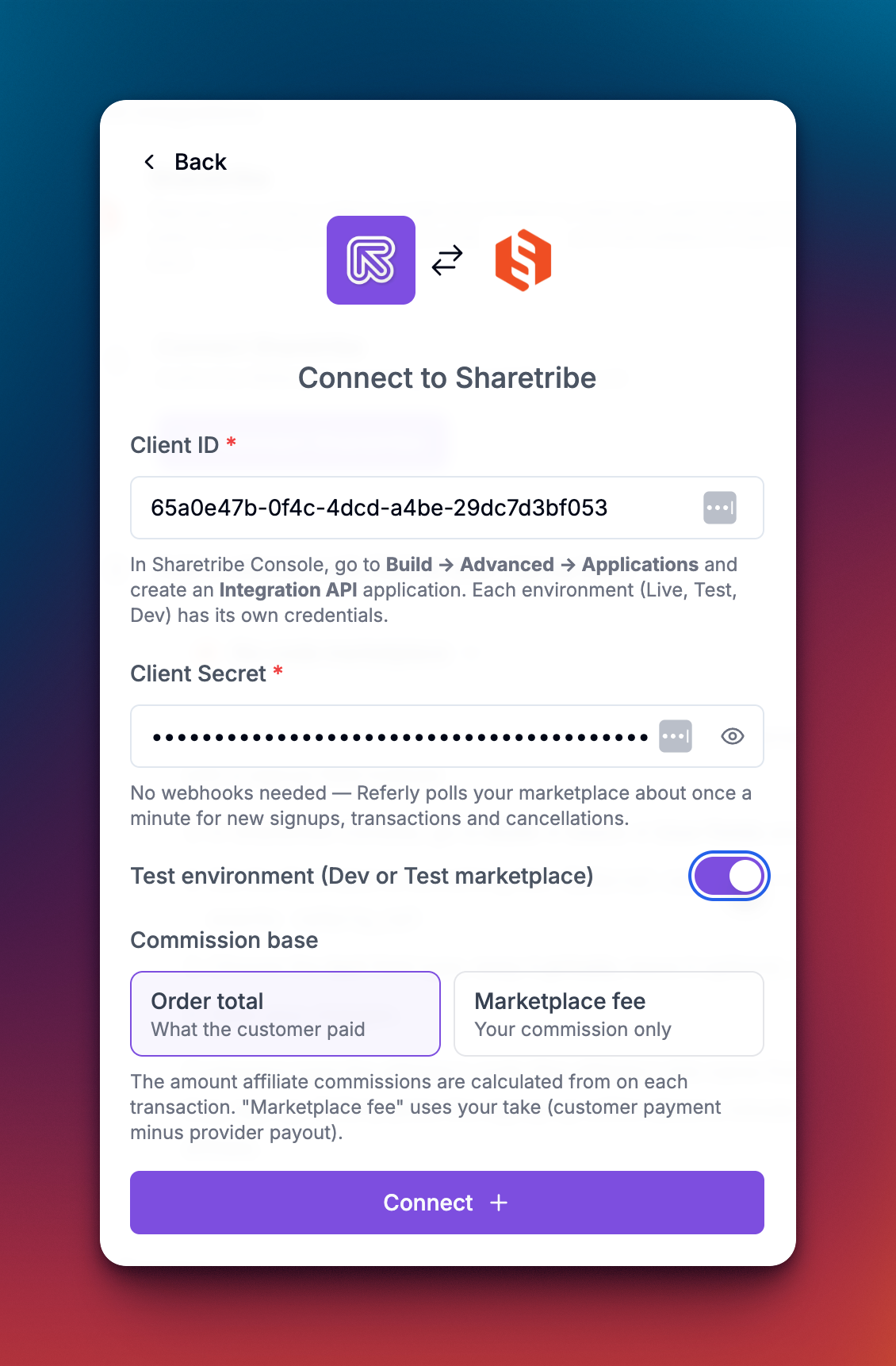
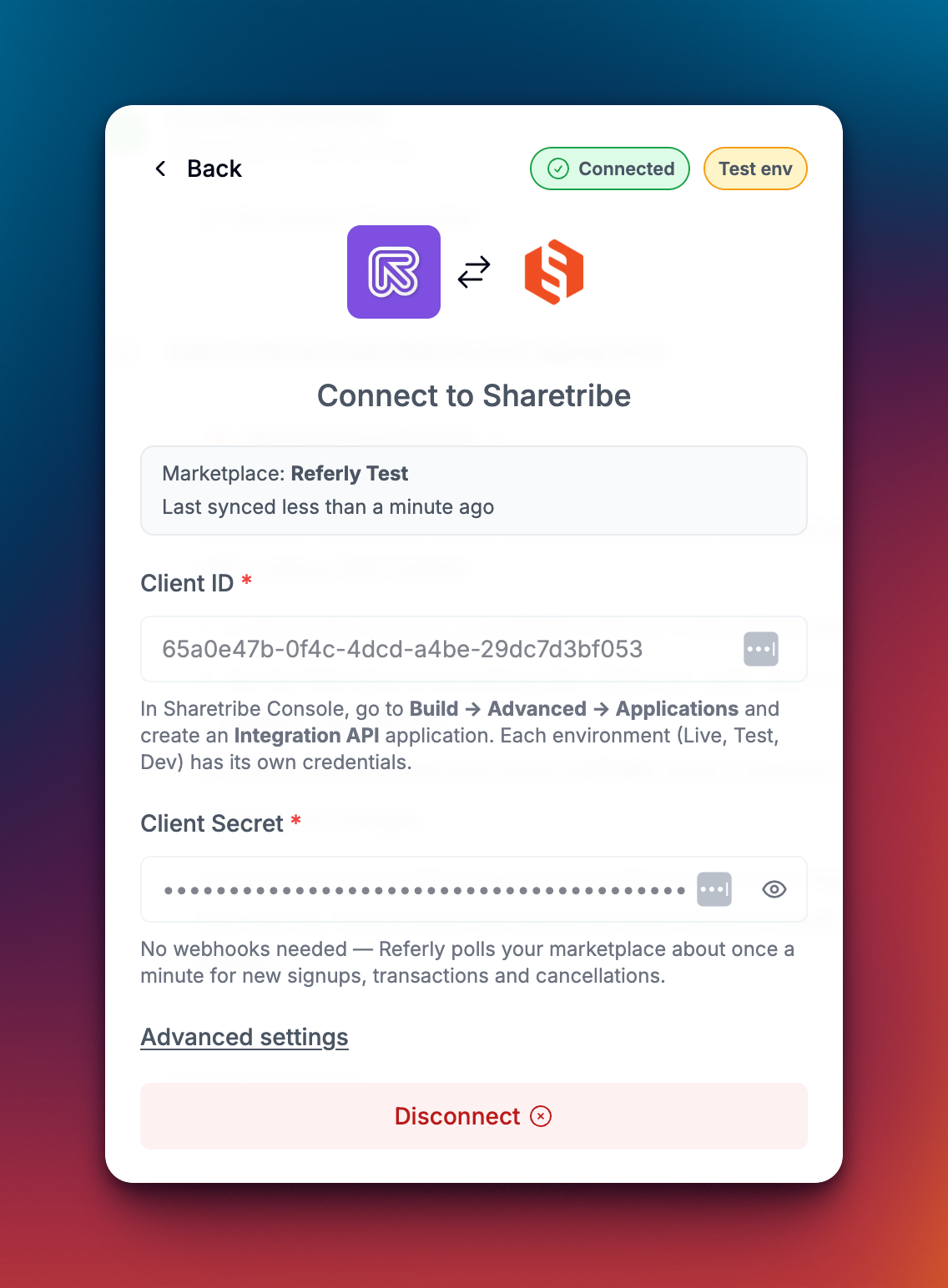
Back in Referly, open the Sharetribe dialog under **Settings**, then **Integrations**.
1. Paste your **Client ID**.
2. Paste your **Client Secret**.
3. If you're connecting a Dev or Test marketplace, turn on **Test environment (Dev or Test marketplace)**.
4. Click **Connect**.
Referly checks the credentials against your marketplace before saving, so you'll know straight away if something is wrong. There's no webhook to create and nothing to paste back into Sharetribe — once this is connected, Referly starts checking your marketplace about once a minute.
## Step 3: Choose what commission is based on
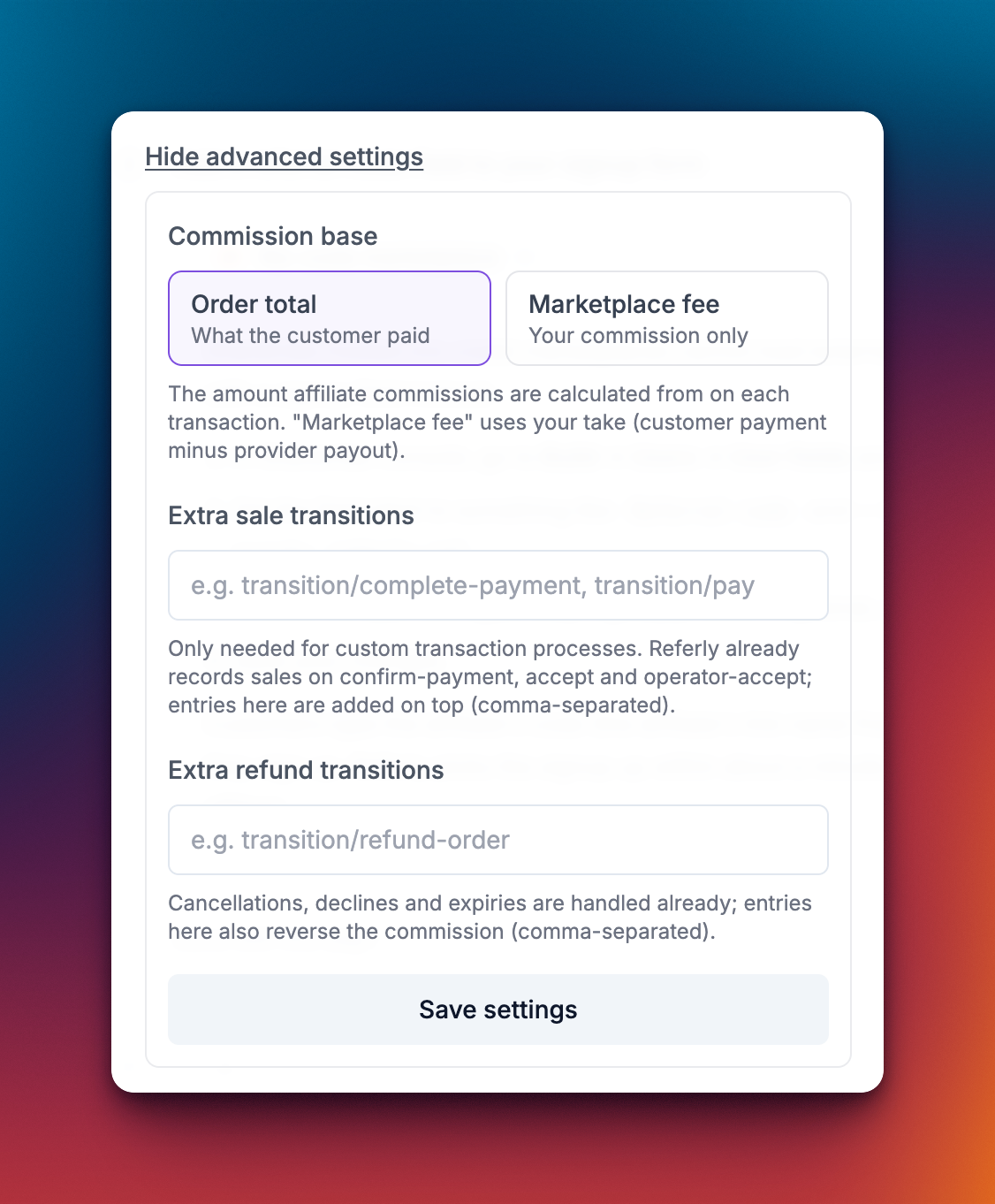
Marketplaces are unusual in that the money passing through them isn't all yours. Sharetribe collects the full amount from the buyer, pays out the provider, and keeps a marketplace fee. So Referly asks which of those numbers your affiliates get paid on:
* **Order total** — commission is worked out on the whole amount the customer paid. Use this when you want affiliates paid on the size of the sale they brought in. Most programs use this.
* **Marketplace fee** — commission is worked out on your take alone: the customer payment minus the provider payout. Use this when you're paying affiliates out of your own margin and want the rate to mean the same thing on every listing.
You choose this when you connect, and you can change it later under **Advanced settings** in the same dialog.
Changing the setting affects commissions worked out from that point on. Sales already recorded keep the figures they were given.
## Step 4: Turn on Referral sources
This is the step that connects an affiliate to a signup, and it's a one-time Console setting. Sharetribe's Referral sources feature watches for a URL parameter on the links people arrive through — and every Referly affiliate link already carries one, `?ref=` followed by the affiliate's link name. Once you switch it on, a visitor who lands anywhere on your marketplace through an affiliate link is remembered for 90 days, and if they sign up in that window — even weeks later — Sharetribe saves who referred them.
In Sharetribe Console, go to **Users**, then **User types**, and open the user type your customers sign up with.
Under **Referral sources**, click **+ Add a new referral source**.
Name it "Referly" so you recognise it later. Then set the **URL parameter name** to exactly `ref` — this part matters, because it has to match the parameter on your affiliates' links.
Each user type has its own referral sources, so add the same one to every user type people can sign up with, then save.
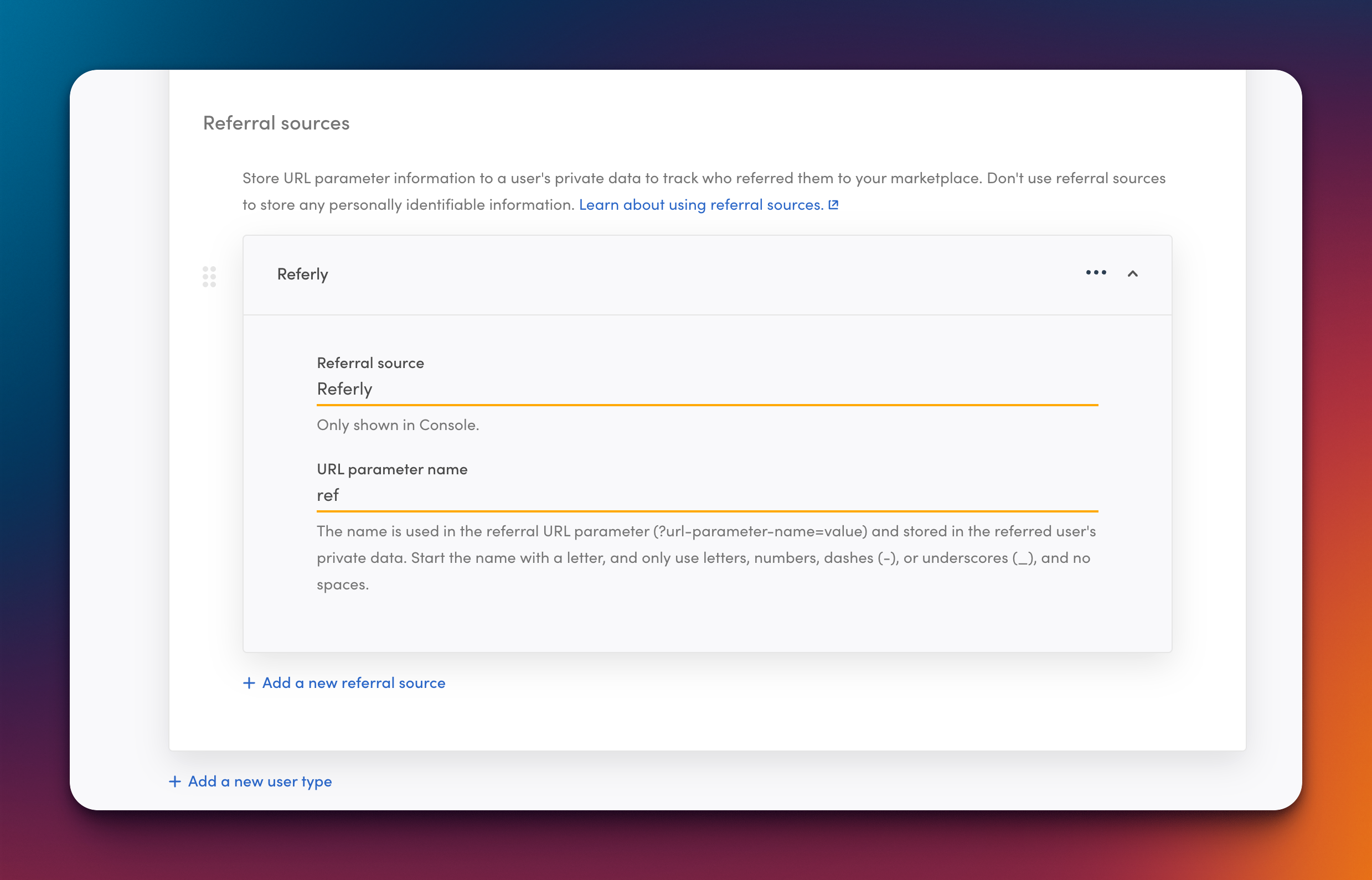
That's the whole capture. Your affiliates don't need to do anything new — the links in their affiliate portal already carry `?ref=` and work as-is. Attribution is first-touch: the first affiliate link a person arrives through is the one that gets the credit.
If you've customised your program's link parameter in Referly (most programs use the default, `ref`), set the URL parameter name to match yours instead.
### Optional: click analytics on a custom-code template
If you run the Sharetribe Web Template on your own hosting, you can additionally run the Referly tracking script. Referral sources already handles attribution on its own — the script adds click-level data on top: every click counted, landing pages, countries and devices. There are two changes, and one optional third.
**1. Add the tracking script where your template injects scripts**, alongside the analytics scripts it already loads:
```javascript Tracking script theme={null}
scripts.push(
);
```
Your program ID is filled in for you on the Sharetribe guide inside Referly. Your template's Content Security Policy also needs to allow Referly — add `https://www.referly.so` to both the script source and the connect source, or the script is blocked with no visible error.
**2. Send the tracked referral with the signup.** Where your template submits the signup, merge the referral into the new user's protected data under the key `referly_ref`:
```javascript Signup theme={null}
const referlyRef =
typeof window !== "undefined" && window.affiliateId
? String(window.affiliateId)
: null;
const signupParams = referlyRef
? {
...params,
protectedData: {
...(params.protectedData || {}),
referly_ref: referlyRef,
},
}
: params;
```
**3. Optionally stamp the transaction too.** Adding the same value to the order's protected data when a transaction starts gives the tightest attribution, because it credits the affiliate even when the buyer signed up long before your program existed. This one needs your transaction process to accept protected data on its first transition.
```javascript Checkout theme={null}
const orderParams = {
...baseOrderParams,
protectedData: {
...(baseOrderParams.protectedData || {}),
referly_ref: window.affiliateId ? String(window.affiliateId) : undefined,
},
};
```
The full, copyable versions of all three are in your Referly dashboard, on the **Custom-code template** tab of the Sharetribe guide.
## Do clicks get tracked?
Not on their own, and this is worth understanding before you promise affiliates click reports.
Clicks are not tracked unless you either turn on Referly short links or run a custom-coded site. A Sharetribe-hosted marketplace can't run the Referly tracking script, and an affiliate link points straight at your marketplace — so the visit goes from the affiliate's audience to Sharetribe without ever passing through Referly. Nothing on our side sees it. Signups and sales are still tracked in full, because those come from your marketplace's own data; it's only the click itself that goes uncounted, which means click-through and conversion rates stay empty.
There are two ways to get them.
### Turn on automated short links
This is the option for a Sharetribe-hosted marketplace, and it takes about a minute. With short links on, an affiliate's link points at Referly first: we record the click, then forward the visitor to your marketplace carrying the same `?ref=` parameter.
Go to **Settings**, then **Program details**, then **Automated short links**.
Use `refurl.link`, or a custom domain of your own once it's verified.
Short links are generated for every affiliate automatically, and their portal shows the short link in place of the long one. Your affiliates don't have to do anything or re-copy anything.
Short links change nothing about attribution — the referral is still captured by Sharetribe's Referral sources from the `?ref=` parameter the redirect passes through. They only add the click record in front of it.
### Or run the tracking script
Only possible on a custom-coded (self-hosted) template, where the script records every click along with the landing page, country and device. See the tracking-script steps on the **Custom-code template** tab of the Sharetribe guide in your Referly dashboard.
## How Referly decides who gets credit
When a transaction comes through, Referly looks for the affiliate in this order:
1. **The referral on the transaction itself** — the most accurate, and only present if you did the optional third change above.
2. **The customer's existing referral** — if that person was already recorded as referred by an affiliate when they signed up, the sale goes to that affiliate.
3. **The referral stored on the customer** — the value captured at signup, whether saved by Sharetribe's Referral sources or carried in by the tracking script.
That second rung is why a buyer only has to be attributed once: every later purchase they make keeps crediting the same affiliate, with nothing extra to carry through checkout.
The referral value itself can be either an affiliate's link name captured from the URL or a tracked click from the script — Referly recognises both, as long as **link tracking is switched on** for your program under [tracking methods](/docs/help-center/settings/program/tracking-methods).
## Step 5: Set your commission and test it end to end
Set your rate first — a percentage or a fixed amount — and remember it applies to whichever base you picked in Step 3. You can add rules for individual listings once Sharetribe is connected.
Then run the whole thing once before you go live:
Use your Test environment's Client ID and Secret with **Test environment** turned on.
Arrive through a real affiliate link first — it lands on your marketplace as `?ref=` plus the affiliate's link name — browse around if you like, then sign up as normal. Nothing to type; the referrer travels with you.
The referral appears in your Referly dashboard, credited to that affiliate. If it doesn't, the problem is in Step 4.
As that same customer. A purchase is recorded once the payment is confirmed; a booking once it's accepted.
Cancel or decline the test transaction in Console, wait another minute, and check that the commission has been reversed in Referly.
Disconnect, then reconnect with your Live marketplace's credentials and **Test environment** turned off.
## What gets tracked automatically
Once you're connected, all of this happens on its own, within about a minute:
| What happens in your marketplace | What Referly does |
| ------------------------------------------------ | ------------------------------------------- |
| A new user signs up carrying a referral | Records the referral against that affiliate |
| A purchase payment is confirmed | Records the sale and credits the commission |
| A booking is accepted, by the provider or by you | Records the sale and credits the commission |
| A transaction is cancelled | Reverses the commission in full |
| A transaction is declined | Reverses the commission in full |
| A payment expires before it completes | Reverses the commission in full |
| A transaction's totals are zeroed out | Treated as a refund and reversed |
## Custom transaction processes
If your marketplace uses a custom transaction process with its own transition names, Referly won't recognise them out of the box — it knows the default purchase and booking transitions. You can teach it yours.
Open the Sharetribe dialog in Referly and select **Advanced settings**. There are two fields, both comma-separated:
* **Extra sale transitions** — transitions that should record a sale. Referly already records one when a payment is confirmed, and when a booking is accepted by the provider or by an operator. Anything you list here is added on top.
* **Extra refund transitions** — transitions that should reverse a commission. Cancellations, declines and expiries are already handled; anything you list here reverses too.
Then select **Save settings**. You can leave the `transition/` prefix off — Referly accepts the names either way.
## Cancellations and refunds
When a transaction is cancelled, declined, or its payment expires, Referly finds the matching sale and reverses the commission, so you don't pay out on an order that never completed.
Two things to know:
* **Reversals are always the full commission.** Sharetribe's Stripe integration only issues full refunds, so there's no partial reversal to work out.
* **This applies while the commission is still on hold.** Once your payout hold period has passed and the affiliate has been cleared for payout, the sale is left alone — adjust it by hand if you want it reversed. See [Refunds](/docs/help-center/manage/rewards/refunds) and [Reward holds](/docs/help-center/manage/rewards/holds).
## Disconnecting
Open the Sharetribe dialog in Referly and select **Disconnect**. Referly stops checking your marketplace immediately.
For a clean break, also delete the Integration API application in Sharetribe Console under **Build**, then **Advanced**, then **Applications** — that revokes the credentials entirely.
Nothing already tracked is deleted. Signups and transactions that happen while you're disconnected are not recorded and can't be picked up later, so add them by hand with [Add a sale](/docs/help-center/manage/customers/add-a-sale) if you need to.
## Troubleshooting
First give it a couple of minutes — nothing here is instant. Then check you connected the right environment: Test credentials only ever see Test marketplace activity. If you're testing on your Live marketplace with Test credentials connected, you'll see nothing.
Check the referral source's **URL parameter name** is exactly `ref` (or your program's custom link parameter) — a mismatch here looks fine in Console and captures nothing. Then check it's added to the user type the person actually signed up with, since each user type has its own referral sources. And remember capture is per browser and first-touch: signing up in a different browser than the one that opened the link won't carry the referral.
Check your Content Security Policy first — this is the usual cause, and the script is blocked without any visible error. Both the script source and the connect source need to allow `https://www.referly.so`. After that, confirm the signup actually sends the referral in the new user's protected data.
Your marketplace probably uses a custom transaction process. Referly records a sale when a payment is confirmed or a booking is accepted; if your process renames those transitions, add them under **Advanced settings** as extra sale transitions.
Same cause, other direction — add your process's cancellation transitions as extra refund transitions under **Advanced settings**. Also check the commission hasn't already been cleared for payout, because a cleared reward isn't reversed automatically.
Check which base you're on in **Advanced settings**. On **Marketplace fee**, commission is worked out on your take rather than the order total, so the figures are much smaller than the sale amounts by design.
Make sure the application you created is an **Integration API** application and not a Marketplace API one, that you copied the whole secret, and that the environment toggle in Referly matches the environment the credentials came from.
## Related
Link tracking has to be on for Sharetribe referrals to be credited.
Pay different rates on different marketplace listings.
Record a sale by hand when a transaction wasn't attributed.
See every platform Referly connects to.
## What the Sharetribe integration can and can't do
| What you want to track | Does Sharetribe cover it? |
| ---------------------------------------- | -------------------------------------------------------------------------------------------------------------------------------------------------------------------------------------------------------------------------------------------------------------------- |
| **Signups** | Yes — a new user carrying a referral is recorded against the affiliate who sent them, before any money moves. |
| **Purchases** | Yes — recorded once the payment is confirmed, with the amount, the listing and the currency. |
| **Bookings** | Yes — recorded once the booking is accepted, whether the provider accepted it or you did as the operator. |
| **Listing-level commission rules** | Yes — rules can target individual listings, so different listings can carry different rates. |
| **Commission on your marketplace fee** | Yes — you choose whether commission is worked out on the whole order or on your take alone. See [Step 3](#step-3-choose-what-commission-is-based-on). |
| **Cancellations, declines and expiries** | Yes — each one reverses the commission automatically. |
| **Custom transaction processes** | Yes — the default purchase and booking processes work out of the box, and you can add your own transition names. See [Custom transaction processes](#custom-transaction-processes). |
| **Discount code attribution** | No — Sharetribe has no discount-code system, so attribution runs on affiliate links, which Sharetribe captures automatically. |
| **A discount code per affiliate** | No, for the same reason. |
| **Subscription renewals** | No — Sharetribe transactions are one-off, so there's nothing recurring to follow. |
| **Commission before tax** | No — Sharetribe orders carry no separate tax line, so commission is worked out on the order total. |
| **Commission before shipping** | No — shipping is part of the order total and isn't deducted. |
| **Partial refunds** | No — Sharetribe's Stripe integration only issues full refunds, so a reversal is always the whole commission. |
| **Click tracking** | Not on a Sharetribe-hosted marketplace — it can't run a tracking script, so clicks are only counted if you turn on Referly short links or run a custom-coded site. Referrals and sales are tracked either way. See [Do clicks get tracked?](#do-clicks-get-tracked). |
| **Instant tracking** | No — because there's no webhook, signups and sales appear within about a minute rather than the same second. |
## Which setup do you have?
Every marketplace captures referrals the same way — through Sharetribe's Referral sources feature in [Step 4](#step-4-turn-on-referral-sources). The only difference is an optional extra:
Your marketplace is hosted by Sharetribe and you build it in Console. Referral sources is all you need — affiliate links are tracked automatically with no code at all.
You run the Sharetribe Web Template on your own hosting. Referral sources works exactly the same, and you can additionally run the Referly tracking script for click-level analytics.
## Before you start
You'll need:
* **Admin access to Sharetribe Console**, so you can create an Integration API application and edit your user types.
* **A developer**, only if you want the optional tracking-script extras on a custom-code template. The core setup needs no code at all.
* **Your Referly program open.** Go to your program, then **Settings**, then **Integrations**, and choose **Sharetribe**.

Every Sharetribe environment — Live, Test and Dev — has its own Integration API credentials. Connect your Test environment first and rehearse the whole flow, then swap in your Live credentials when you're happy.
## Step 1: Create an Integration API application in Sharetribe
This is what lets Referly read your marketplace.
In Sharetribe Console, go to **Build**, then **Advanced**, then **Applications**.
Choose **Integration API** as the type — not the Marketplace API. Give it a name you'll recognise later, such as "Referly".
Copy the **Client ID** and the **Client Secret**. The secret is shown only once, when the application is created, so copy it now — if you lose it you'll need to create a new application.

Make sure you're in the right environment before you create the application. Credentials from your Test marketplace only ever see Test data, and credentials from Live only see Live data — they aren't interchangeable.
## Step 2: Connect Sharetribe in Referly
Back in Referly, open the Sharetribe dialog under **Settings**, then **Integrations**.
1. Paste your **Client ID**.
2. Paste your **Client Secret**.
3. If you're connecting a Dev or Test marketplace, turn on **Test environment (Dev or Test marketplace)**.
4. Click **Connect**.
Referly checks the credentials against your marketplace before saving, so you'll know straight away if something is wrong. There's no webhook to create and nothing to paste back into Sharetribe — once this is connected, Referly starts checking your marketplace about once a minute.


## Step 3: Choose what commission is based on
Marketplaces are unusual in that the money passing through them isn't all yours. Sharetribe collects the full amount from the buyer, pays out the provider, and keeps a marketplace fee. So Referly asks which of those numbers your affiliates get paid on:
* **Order total** — commission is worked out on the whole amount the customer paid. Use this when you want affiliates paid on the size of the sale they brought in. Most programs use this.
* **Marketplace fee** — commission is worked out on your take alone: the customer payment minus the provider payout. Use this when you're paying affiliates out of your own margin and want the rate to mean the same thing on every listing.
You choose this when you connect, and you can change it later under **Advanced settings** in the same dialog.

Changing the setting affects commissions worked out from that point on. Sales already recorded keep the figures they were given.
## Step 4: Turn on Referral sources
This is the step that connects an affiliate to a signup, and it's a one-time Console setting. Sharetribe's Referral sources feature watches for a URL parameter on the links people arrive through — and every Referly affiliate link already carries one, `?ref=` followed by the affiliate's link name. Once you switch it on, a visitor who lands anywhere on your marketplace through an affiliate link is remembered for 90 days, and if they sign up in that window — even weeks later — Sharetribe saves who referred them.
In Sharetribe Console, go to **Users**, then **User types**, and open the user type your customers sign up with.
Under **Referral sources**, click **+ Add a new referral source**.
Name it "Referly" so you recognise it later. Then set the **URL parameter name** to exactly `ref` — this part matters, because it has to match the parameter on your affiliates' links.
Each user type has its own referral sources, so add the same one to every user type people can sign up with, then save.

That's the whole capture. Your affiliates don't need to do anything new — the links in their affiliate portal already carry `?ref=` and work as-is. Attribution is first-touch: the first affiliate link a person arrives through is the one that gets the credit.
If you've customised your program's link parameter in Referly (most programs use the default, `ref`), set the URL parameter name to match yours instead.
### Optional: click analytics on a custom-code template
If you run the Sharetribe Web Template on your own hosting, you can additionally run the Referly tracking script. Referral sources already handles attribution on its own — the script adds click-level data on top: every click counted, landing pages, countries and devices. There are two changes, and one optional third.
**1. Add the tracking script where your template injects scripts**, alongside the analytics scripts it already loads:
```javascript Tracking script theme={null}
scripts.push(
);
```
Your program ID is filled in for you on the Sharetribe guide inside Referly. Your template's Content Security Policy also needs to allow Referly — add `https://www.referly.so` to both the script source and the connect source, or the script is blocked with no visible error.
**2. Send the tracked referral with the signup.** Where your template submits the signup, merge the referral into the new user's protected data under the key `referly_ref`:
```javascript Signup theme={null}
const referlyRef =
typeof window !== "undefined" && window.affiliateId
? String(window.affiliateId)
: null;
const signupParams = referlyRef
? {
...params,
protectedData: {
...(params.protectedData || {}),
referly_ref: referlyRef,
},
}
: params;
```
**3. Optionally stamp the transaction too.** Adding the same value to the order's protected data when a transaction starts gives the tightest attribution, because it credits the affiliate even when the buyer signed up long before your program existed. This one needs your transaction process to accept protected data on its first transition.
```javascript Checkout theme={null}
const orderParams = {
...baseOrderParams,
protectedData: {
...(baseOrderParams.protectedData || {}),
referly_ref: window.affiliateId ? String(window.affiliateId) : undefined,
},
};
```
The full, copyable versions of all three are in your Referly dashboard, on the **Custom-code template** tab of the Sharetribe guide.
## Do clicks get tracked?
Not on their own, and this is worth understanding before you promise affiliates click reports.
Clicks are not tracked unless you either turn on Referly short links or run a custom-coded site. A Sharetribe-hosted marketplace can't run the Referly tracking script, and an affiliate link points straight at your marketplace — so the visit goes from the affiliate's audience to Sharetribe without ever passing through Referly. Nothing on our side sees it. Signups and sales are still tracked in full, because those come from your marketplace's own data; it's only the click itself that goes uncounted, which means click-through and conversion rates stay empty.
There are two ways to get them.
### Turn on automated short links
This is the option for a Sharetribe-hosted marketplace, and it takes about a minute. With short links on, an affiliate's link points at Referly first: we record the click, then forward the visitor to your marketplace carrying the same `?ref=` parameter.
Go to **Settings**, then **Program details**, then **Automated short links**.
Use `refurl.link`, or a custom domain of your own once it's verified.
Short links are generated for every affiliate automatically, and their portal shows the short link in place of the long one. Your affiliates don't have to do anything or re-copy anything.
Short links change nothing about attribution — the referral is still captured by Sharetribe's Referral sources from the `?ref=` parameter the redirect passes through. They only add the click record in front of it.
### Or run the tracking script
Only possible on a custom-coded (self-hosted) template, where the script records every click along with the landing page, country and device. See the tracking-script steps on the **Custom-code template** tab of the Sharetribe guide in your Referly dashboard.
## How Referly decides who gets credit
When a transaction comes through, Referly looks for the affiliate in this order:
1. **The referral on the transaction itself** — the most accurate, and only present if you did the optional third change above.
2. **The customer's existing referral** — if that person was already recorded as referred by an affiliate when they signed up, the sale goes to that affiliate.
3. **The referral stored on the customer** — the value captured at signup, whether saved by Sharetribe's Referral sources or carried in by the tracking script.
That second rung is why a buyer only has to be attributed once: every later purchase they make keeps crediting the same affiliate, with nothing extra to carry through checkout.
The referral value itself can be either an affiliate's link name captured from the URL or a tracked click from the script — Referly recognises both, as long as **link tracking is switched on** for your program under [tracking methods](/docs/help-center/settings/program/tracking-methods).
## Step 5: Set your commission and test it end to end
Set your rate first — a percentage or a fixed amount — and remember it applies to whichever base you picked in Step 3. You can add rules for individual listings once Sharetribe is connected.
Then run the whole thing once before you go live:
Use your Test environment's Client ID and Secret with **Test environment** turned on.
Arrive through a real affiliate link first — it lands on your marketplace as `?ref=` plus the affiliate's link name — browse around if you like, then sign up as normal. Nothing to type; the referrer travels with you.
The referral appears in your Referly dashboard, credited to that affiliate. If it doesn't, the problem is in Step 4.
As that same customer. A purchase is recorded once the payment is confirmed; a booking once it's accepted.
Cancel or decline the test transaction in Console, wait another minute, and check that the commission has been reversed in Referly.
Disconnect, then reconnect with your Live marketplace's credentials and **Test environment** turned off.
## What gets tracked automatically
Once you're connected, all of this happens on its own, within about a minute:
| What happens in your marketplace | What Referly does |
| ------------------------------------------------ | ------------------------------------------- |
| A new user signs up carrying a referral | Records the referral against that affiliate |
| A purchase payment is confirmed | Records the sale and credits the commission |
| A booking is accepted, by the provider or by you | Records the sale and credits the commission |
| A transaction is cancelled | Reverses the commission in full |
| A transaction is declined | Reverses the commission in full |
| A payment expires before it completes | Reverses the commission in full |
| A transaction's totals are zeroed out | Treated as a refund and reversed |
## Custom transaction processes
If your marketplace uses a custom transaction process with its own transition names, Referly won't recognise them out of the box — it knows the default purchase and booking transitions. You can teach it yours.
Open the Sharetribe dialog in Referly and select **Advanced settings**. There are two fields, both comma-separated:
* **Extra sale transitions** — transitions that should record a sale. Referly already records one when a payment is confirmed, and when a booking is accepted by the provider or by an operator. Anything you list here is added on top.
* **Extra refund transitions** — transitions that should reverse a commission. Cancellations, declines and expiries are already handled; anything you list here reverses too.
Then select **Save settings**. You can leave the `transition/` prefix off — Referly accepts the names either way.
## Cancellations and refunds
When a transaction is cancelled, declined, or its payment expires, Referly finds the matching sale and reverses the commission, so you don't pay out on an order that never completed.
Two things to know:
* **Reversals are always the full commission.** Sharetribe's Stripe integration only issues full refunds, so there's no partial reversal to work out.
* **This applies while the commission is still on hold.** Once your payout hold period has passed and the affiliate has been cleared for payout, the sale is left alone — adjust it by hand if you want it reversed. See [Refunds](/docs/help-center/manage/rewards/refunds) and [Reward holds](/docs/help-center/manage/rewards/holds).
## Disconnecting
Open the Sharetribe dialog in Referly and select **Disconnect**. Referly stops checking your marketplace immediately.
For a clean break, also delete the Integration API application in Sharetribe Console under **Build**, then **Advanced**, then **Applications** — that revokes the credentials entirely.
Nothing already tracked is deleted. Signups and transactions that happen while you're disconnected are not recorded and can't be picked up later, so add them by hand with [Add a sale](/docs/help-center/manage/customers/add-a-sale) if you need to.
## Troubleshooting
First give it a couple of minutes — nothing here is instant. Then check you connected the right environment: Test credentials only ever see Test marketplace activity. If you're testing on your Live marketplace with Test credentials connected, you'll see nothing.
Check the referral source's **URL parameter name** is exactly `ref` (or your program's custom link parameter) — a mismatch here looks fine in Console and captures nothing. Then check it's added to the user type the person actually signed up with, since each user type has its own referral sources. And remember capture is per browser and first-touch: signing up in a different browser than the one that opened the link won't carry the referral.
Check your Content Security Policy first — this is the usual cause, and the script is blocked without any visible error. Both the script source and the connect source need to allow `https://www.referly.so`. After that, confirm the signup actually sends the referral in the new user's protected data.
Your marketplace probably uses a custom transaction process. Referly records a sale when a payment is confirmed or a booking is accepted; if your process renames those transitions, add them under **Advanced settings** as extra sale transitions.
Same cause, other direction — add your process's cancellation transitions as extra refund transitions under **Advanced settings**. Also check the commission hasn't already been cleared for payout, because a cleared reward isn't reversed automatically.
Check which base you're on in **Advanced settings**. On **Marketplace fee**, commission is worked out on your take rather than the order total, so the figures are much smaller than the sale amounts by design.
Make sure the application you created is an **Integration API** application and not a Marketplace API one, that you copied the whole secret, and that the environment toggle in Referly matches the environment the credentials came from.
## Related
Link tracking has to be on for Sharetribe referrals to be credited.
Pay different rates on different marketplace listings.
Record a sale by hand when a transaction wasn't attributed.
See every platform Referly connects to.